RatHat Android Trojan
RatHat Android Trojan Accessibility Abuse ADB Self-Pairing AI-Assisted UI Automation
Overview
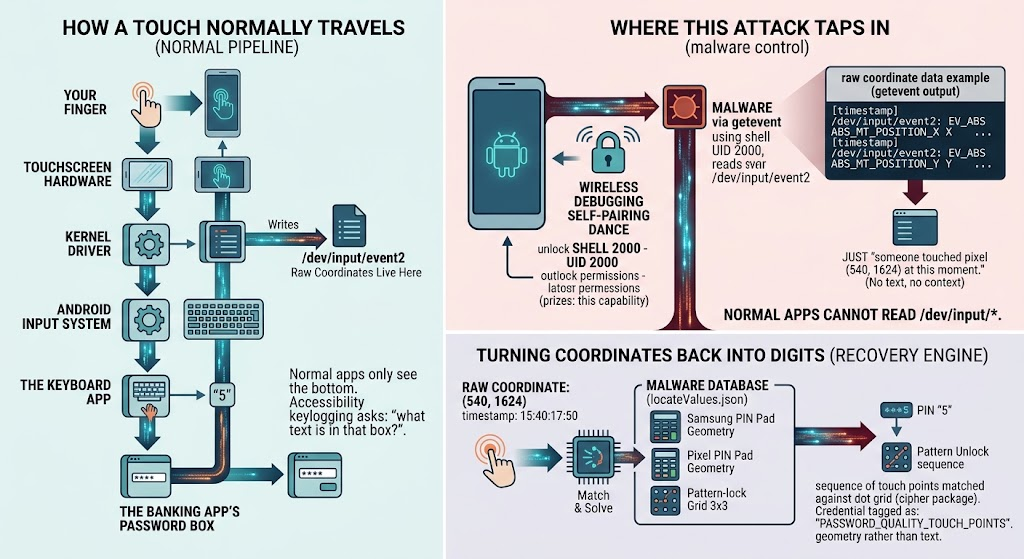
RatHat is a newly identified Android Trojan that combines Accessibility Service abuse, Android Wireless Debugging/ADB self-pairing, native shell-level components, reverse tunneling, credential theft, and generative-AI-assisted UI automation.
Infection commonly starts through smishing, malicious ads, deceptive sites, or third-party APK repositories. Victims are socially engineered to sideload a malicious APK and grant Accessibility permissions. RatHat then automates settings navigation, enables Developer Options and Wireless Debugging, retrieves the six-digit ADB pairing code, and pairs to the device's own ADB service.
This behavior allows the malware to move beyond normal Android app sandbox constraints and establish shell-level execution capability.
Technical Details
Core Components
- Malicious Android app/dropper to obtain Accessibility access and control device UI.
- Go-based
liblocal-service.soagent to execute commands through acquired shell access and support persistence/system manipulation. libmedia_codec.so(FRP component) to establish reverse tunneling to attacker infrastructure and expose remote access into the ADB environment.
Primary Behaviors
- Accessibility abuse for UI reading, synthetic taps, information extraction, and app-interaction automation.
- Raw input monitoring that captures touch coordinates and correlates them to keypad/pattern layouts for PIN/pattern reconstruction.
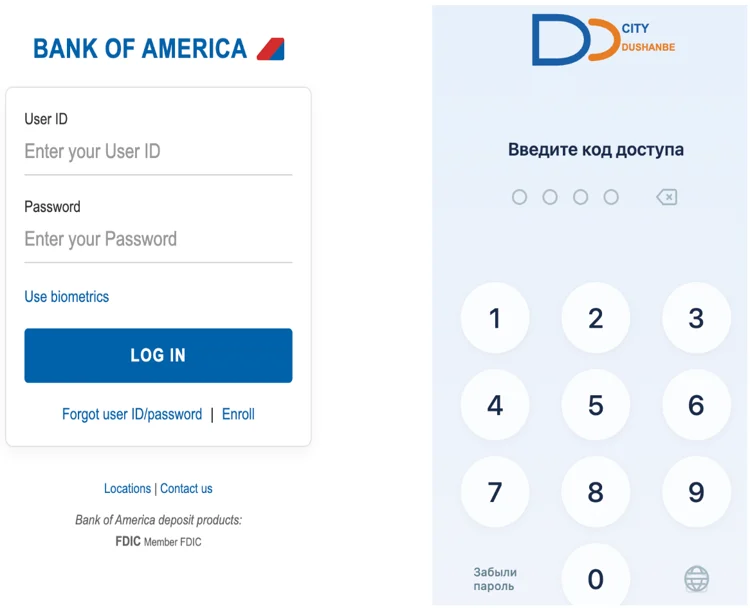
- Credential theft through overlay-style imitation of targeted finance/payment interfaces.
- SMS and notification interception that can expose OTP/MFA codes.
- Screen monitoring/capture for broader victim-activity visibility.
AI-Assisted Automation
- RatHat serializes the Accessibility tree into XML.
- UI data is sent to a generative-AI assistant.
- AI guidance can identify screen elements, return likely coordinates, and suggest action/navigation steps (including scrolling).
Anti-Analysis Features
Researchers observed:
- APK/container manipulation.
- Extremely large Android manifest design.
- DEX bytecode poisoning and encrypted strings.
- Runtime checks for debugging, Frida, Xposed, root, and emulator conditions.
Technical Specifications
| Attribute | Details |
|---|---|
| Malware Name | RatHat |
| Platform | Android |
| Initial Delivery | Smishing, malvertising, deceptive websites, third-party APK sources |
| Privilege Expansion Path | Accessibility abuse -> enable Wireless Debugging -> ADB self-pairing -> shell-level access |
| Remote Access Method | Reverse tunnel via native FRP-related component |
| Credential/Data Targets | Banking/payment credentials, OTP/MFA codes, unlock secrets, UI/session data |
| Notable Innovation | Generative-AI-assisted UI decision support |
Affected Products
- Android devices where users can install apps from untrusted sources.
- Devices where Accessibility abuse and Wireless Debugging enablement are not monitored.
- Personal and enterprise-managed devices used for financial, payment, or corporate authentication workflows.
Attack Scenario
- Victim receives or encounters malicious APK delivery (phishing, smishing, malvertising, or fake app source).
- Victim installs malware and grants Accessibility permissions.
- RatHat uses Accessibility to enable Developer Options and Wireless Debugging.
- Malware retrieves ADB pairing code and self-pairs with local ADB service.
- Native components activate shell operations, reverse tunnel access, and persistence.
- Malware captures credentials, OTPs, PINs/patterns, and screen/UI context.
- AI-assisted logic helps automate complex UI navigation for account-abuse workflows.
- Stolen data is used for account takeover and broader fraud/abuse operations.
Impact Assessment
- Theft of banking/payment usernames, passwords, PINs, and authentication codes
- OTP/MFA interception via SMS/notification access
- Theft of device unlock credentials and behavioral UI data
- Persistent remote shell-level access through reverse tunneling
- Increased exposure of corporate accounts when infected devices are used for work authentication
- Elevated risk of account takeover across banking, payment, messaging, and enterprise services
- High due to multi-stage privilege expansion, stealth/persistence mechanisms, and AI-assisted automation that can improve attacker reliability
Mitigation Strategies
User-Focused Controls
- Avoid APK installation from unsolicited SMS, ads, or unofficial websites.
- Do not grant Accessibility Service permissions to apps without legitimate accessibility need.
- Keep Developer Options and Wireless Debugging disabled unless explicitly required.
- Keep Android OS and mobile security controls fully updated.
- Monitor for unfamiliar apps and unexpected Accessibility-enabled services.
- Prefer phishing-resistant MFA methods where possible instead of SMS OTP.
Incident Response Guidance
- If RatHat infection is suspected, do not rely solely on uninstalling the visible APK.
- Reported behavior indicates components may persist outside normal app lifecycle.
- Based on vendor findings, a factory reset may be required for full remediation.
Enterprise Mobile Hardening
- Enforce managed-device policy controls for unknown-source installs and developer-feature access.
- Alert on Wireless Debugging enablement and unusual Accessibility-service activity.
- Use mobile threat defense/EDR telemetry to detect UI automation abuse and reverse-tunnel behavior.
Resources and References
Public Reporting
Last Updated: September 21, 2026