WhatsApp Business Document Phishing & RMM Malware Campaign
Phishing Social Engineering RMM Abuse LOLBins Credential Theft
Overview
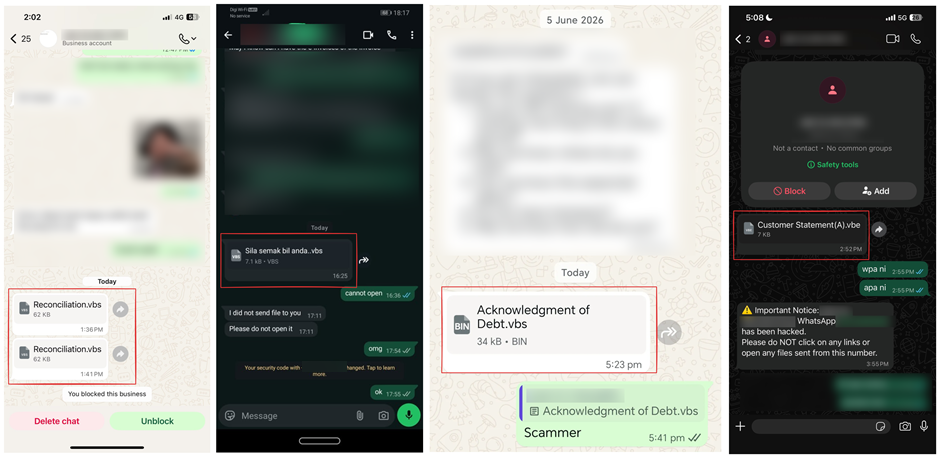
Threat actors conducted a phishing campaign through WhatsApp by sending fake business-related documents — invoices, quotations, and purchase orders — to trick victims into executing malware. The attack relies entirely on social engineering rather than a WhatsApp vulnerability. Once executed, malicious scripts install legitimate Remote Monitoring and Management (RMM) tools such as AnyDesk, ScreenConnect, or TeamViewer, enabling persistent unauthorized remote access to infected systems.
Technical Specifications
| Attribute | Details |
|---|---|
| Campaign Type | WhatsApp-delivered business document phishing |
| Delivery Method | WhatsApp messages impersonating suppliers or business contacts |
| Lure Themes | Fake invoices, RFQs, quotations, and purchase orders |
| File Types Used | ZIP/RAR archives, executables disguised as PDFs or Office documents |
| Execution Technique | Embedded scripts using PowerShell, CMD, HTA, mshta.exe, rundll32.exe |
| Installed Tools | Legitimate RMM software: AnyDesk, ScreenConnect, TeamViewer, and similar |
| Persistence Mechanisms | Scheduled tasks, startup entries, registry modifications |
| CVE IDs | Not applicable (social engineering, no software vulnerability) |
| Attribution | Unknown |
Affected Products
- Windows endpoints where users open WhatsApp Web or mobile-to-PC transferred attachments
- Organizations without controls restricting RMM software installation
- Environments lacking PowerShell and script execution restrictions
- Businesses relying on WhatsApp for supplier and procurement communications
Attack Scenario
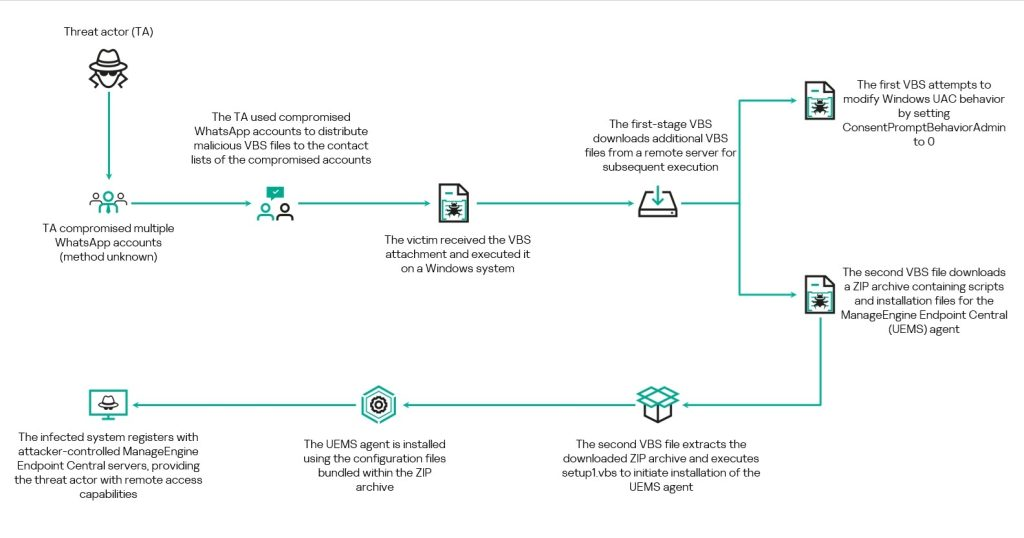
- Attacker sends a WhatsApp message impersonating a supplier, vendor, or business contact.
- Victim receives a fake invoice, RFQ, or procurement document as a ZIP/RAR archive or disguised executable.
- Victim opens the malicious attachment, believing it to be a legitimate business document.
- Embedded scripts execute PowerShell, HTA, or CMD commands using LOLBins such as
mshta.exeorrundll32.exe. - Malware downloads secondary payloads and silently installs a legitimate RMM tool (e.g., AnyDesk, ScreenConnect).
- Persistence is established via scheduled tasks, startup entries, or registry modifications.
- Threat actor gains persistent remote access and may steal credentials, move laterally, exfiltrate data, or deploy ransomware.
Impact
- Persistent unauthorized remote access via legitimate RMM tools evading traditional AV detection
- Potential ransomware deployment following lateral movement
- Registry and scheduled task modifications establishing long-term persistence
- Credential theft from compromised endpoints
- Business Email Compromise (BEC) and financial fraud enabled through account access
- Data exfiltration from infected systems via attacker-controlled RMM sessions
- Lateral movement spreading compromise across enterprise environments
- Operational disruption from ransomware deployment following initial foothold
- Extended incident response burden from covert RMM-based persistence
Mitigations
Immediate Actions
- Verify unexpected WhatsApp business documents through a separate, trusted communication channel before opening
- Block execution of scripts and binaries from temporary and download directories
- Monitor for and block unauthorized RMM software installations (AnyDesk, ScreenConnect, TeamViewer)
Short-term Measures
- Restrict PowerShell and script interpreter execution where not required
- Enable EDR/XDR monitoring and Attack Surface Reduction (ASR) rules
- Use application allowlisting to prevent unauthorized RMM tool installation
Monitoring & Detection
- Monitor for suspicious scheduled tasks, startup entry modifications, and registry persistence mechanisms
- Alert on LOLBin execution chains:
mshta.exe,rundll32.exe,wscript.exespawning network connections - Detect unexpected outbound RMM connections from endpoints not managed by IT-sanctioned tools
- Sandbox attachment analysis for ZIP/RAR files and unexpected executable content
Long-term Solutions
- Train employees on mobile phishing and messaging-platform threats, specifically WhatsApp business lures
- Implement a policy requiring all vendor/supplier documents to arrive via corporate email with gateway scanning
- Maintain an allowlist of approved RMM tools and block all others at the endpoint and network level
Resources
Open-Source Reporting
Last Updated: June 23, 2026