Malicious npm Packages Abused as Phishing Infrastructure
npm Supply Chain Phishing Infrastructure Credential Theft CDN Abuse Microsoft 365
Overview
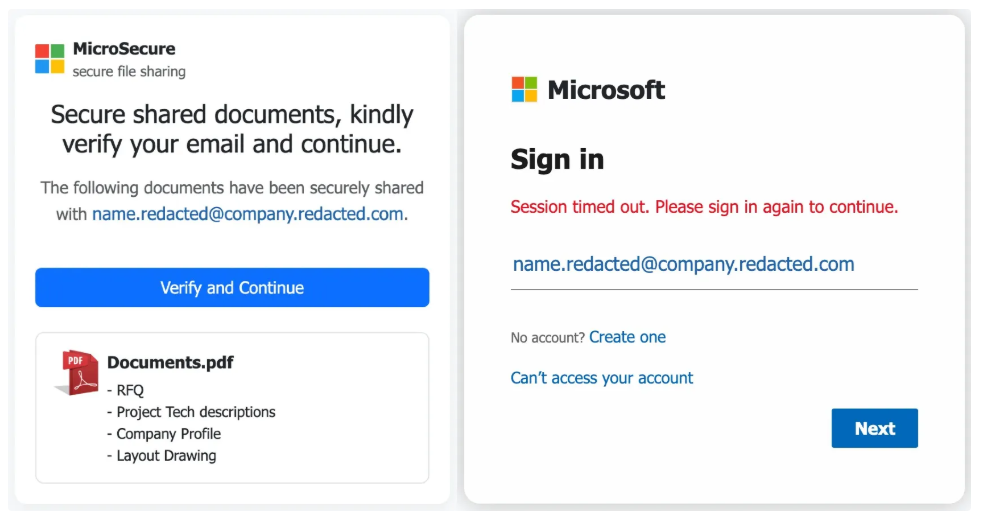
A sophisticated phishing campaign abused the npm package registry to establish trusted phishing infrastructure by publishing 27 malicious JavaScript packages across 6 attacker-controlled accounts. Unlike traditional supply chain attacks targeting developers through malicious code execution, this campaign repurposed npm's content delivery network (CDN) as a hosting platform for phishing payloads. Attackers leveraged npm's trusted domain reputation to serve HTML and JavaScript that impersonated document-sharing portals and redirected victims to fake Microsoft 365 login pages with pre-filled email addresses, indicating highly targeted credential harvesting operations. The malicious packages did not contain functional library code; instead, they hosted phishing HTML/JavaScript files accessible via npm's public CDN endpoints (unpkg.com, cdn.jsdelivr.net). Victims received targeted phishing emails with links to npm-hosted content, saw convincing fake document viewers, and were redirected to credential-stealing pages. The campaign employed anti-analysis techniques including obfuscated JavaScript, bot detection, and user interaction checks (mouse/touch validation) to evade automated security scanning. Infrastructure analysis linked the operation to Evilginx-style adversary-in-the-middle (AitM) frameworks designed for session token theft. Primary targets included healthcare and industrial sectors, suggesting motivation beyond generic credential theft to business email compromise (BEC), supply chain infiltration, and potential operational technology (OT) access. The abuse of npm's trusted infrastructure demonstrates evolving phishing tactics that exploit legitimate developer platforms to bypass traditional security controls relying on domain reputation.
Campaign Specifications
| Attribute | Details |
|---|---|
| Campaign Type | Phishing Infrastructure Abuse, Supply Chain Platform Exploitation |
| Attack Vector | Malicious npm packages hosting phishing content on trusted CDN |
| Malicious Packages | 27 packages published across multiple accounts |
| Attacker Accounts | 6 npm user accounts under attacker control |
| Target Platform | npm (Node Package Manager) registry and CDN infrastructure |
| CDN Services Abused | unpkg.com, cdn.jsdelivr.net (npm package CDN mirrors) |
| Phishing Target | Microsoft 365 / Office 365 enterprise credentials |
| Credential Type | Username, password, session tokens (AitM) |
| Targeting | Highly targeted (pre-filled email addresses in phishing pages) |
| Primary Sectors | Healthcare, Industrial/Manufacturing, Enterprise IT |
| Delivery Method | Spear-phishing emails with links to npm-hosted content |
| Phishing Lure | Fake secure document sharing portals, file viewer interfaces |
| Redirection | Fake Microsoft 365 login pages mimicking legitimate authentication |
| Anti-Analysis | JavaScript obfuscation, bot detection, sandbox evasion, user interaction |
| Infrastructure | Evilginx-style adversary-in-the-middle (AitM) phishing framework |
| Session Hijacking | Yes (token theft via AitM proxy) |
| MFA Bypass | Yes (AitM proxy intercepts tokens, bypasses traditional MFA) |
| Package Removal | Packages removed from npm after discovery |
| Attribution | Unknown threat actor(s), organized campaign |
| Related Campaigns | lotusbail package (WhatsApp data theft, separate but related npm abuse) |
Package Distribution and Targeting
Package Naming Patterns:
- Generic library names suggesting utility functions:
secure-doc-viewer,enterprise-file-access,document-portal-utils - Medical/healthcare themes:
healthcare-records-viewer,medical-doc-access - Industrial/OT themes:
scada-report-viewer,industrial-file-portal - Mimicry of legitimate packages with typosquatting
Victim Targeting:
- Spear-phishing emails: Highly targeted messages to specific individuals
- Context-aware lures: Emails reference legitimate business processes (contract review, invoice approval, compliance document)
- Email spoofing: Appear from trusted colleagues, vendors, or partners
- Pre-filled credentials: Email links include victim's email address as URL parameter, pre-populating phishing form
Sector Focus:
- Healthcare: Targeting hospitals, clinics, medical device companies (potential HIPAA data, medical device access)
- Industrial/Manufacturing: Targeting OT environments (potential ICS/SCADA access, intellectual property)
- Enterprise IT: Generic corporate targeting for BEC and data theft
Attack Scenario
Step-by-Step Campaign
-
Malicious Package Publication
Attacker creates 6 npm user accounts with seemingly legitimate profiles (profile pictures, bio, GitHub links). Publishes 27 packages with benign-sounding names across different accounts to avoid detection. Packages contain no functional code—only HTML/JS phishing payloads. npm automatically publishes packages to public CDNs (unpkg.com, jsDelivr), making phishing content accessible via trusted domains. -
Target Reconnaissance
Attacker researches target organization and identifies specific victims:- LinkedIn reconnaissance for employee names, roles, email formats
- Data breaches / leaks for email addresses
- OSINT for business relationships, active projects, vendor contacts
Targets in healthcare and industrial sectors selected based on campaign goals (credential theft for BEC, OT access, data exfiltration).
-
Spear-Phishing Email Campaign
Attacker sends highly targeted phishing emails to victims:Email Example:
From: contracts@trusted-vendor[.]com (spoofed)
To: john.doe@targetcompany.com
Subject: ACTION REQUIRED: Q4 Contract Amendment - Review by EOD

Hi John,

Please review the attached contract amendment for the Q4 service agreement.
This requires your signature by end of day.

Secure Document: [Click here to view]

Link: https://unpkg.com/secure-doc-viewer@1.2.3/index.html?email=john.doe@targetcompany.com&doc=contract_q4_2024

Best regards,
Sarah Johnson
Vendor Contracts Department
Email crafted to appear legitimate:
- References real business context (Q4 contracts)
- Uses urgency (EOD deadline)
- Spoofs trusted sender (vendor)
- Link goes to trusted npm CDN domain (unpkg.com)
-
Victim Clicks Phishing Link
Victim receives email, verifies sender appears legitimate (or email passes basic checks), and clicks link. Browser loadshttps://unpkg.com/secure-doc-viewer@1.2.3/index.html?email=john.doe@targetcompany.com. Security tools do not block because unpkg.com is trusted developer CDN. Browser loads fake document portal page. -
Fake Document Portal Displayed
Victim sees professional-looking document viewer:- Microsoft or corporate branding
- "Loading document..." spinner
- "Verifying your access..." message
- Pre-filled with victim's email: "john.doe@targetcompany.com"
- "Access Document" or "Sign In to Continue" button
Victim believes this is legitimate document sharing portal (SharePoint, OneDrive, DocuSign).
-
Anti-Analysis Validation
JavaScript executes anti-bot checks:- Detects if automated scanner or sandbox (checks for headless browser, Selenium, PhantomJS)
- Waits for human interaction (mouse movement, touch events)
- If bot detected: Redirects to legitimate Microsoft.com (evades automated security analysis)
- If human detected: Proceeds to Stage 2
Victim moves mouse, clicks button → Passes as human.
-
Redirection to AitM Phishing Page
After 2-3 second "loading" delay (simulating document preparation), JavaScript redirects to attacker-controlled domain:https://login-microsoft365[.]com/auth?email=john.doe@targetcompany.com&redirect=documentVictim's browser loads fake Microsoft 365 login page hosted on attacker infrastructure running Evilginx-style AitM proxy.
-
Credential Entry and Theft
Victim sees pixel-perfect Microsoft 365 login page:- Email pre-filled: john.doe@targetcompany.com
- Prompts for password
- Victim enters password → Submitted to AitM proxy
AitM Proxy Actions: - Captures password - Forwards credentials to real Microsoft login - Microsoft validates credentials - Microsoft prompts for MFA (if enabled)
-
MFA Bypass via AitM
Victim completes MFA on proxied real Microsoft page:- Enters TOTP code from authenticator app, OR
- Approves push notification on mobile device, OR
- Enters SMS code
Microsoft validates MFA and issues session tokens/cookies. AitM proxy intercepts session tokens before returning response to victim. Attacker now has: - Valid username/password - Active session tokens (bypass need for MFA in future)
Victim sees "Login successful" or fake error ("Service temporarily unavailable, try again later") and session closed.
-
Account Takeover and Post-Exploitation
Attacker uses stolen credentials and session tokens for:Immediate Access:
- Login to Microsoft 365 using stolen session tokens
- Access email, OneDrive, SharePoint, Teams
- No MFA prompt needed (token already validated)
Business Email Compromise (BEC):
- Send emails from victim's account to colleagues/partners
- Request wire transfers, gift cards, sensitive information
- Modify email rules (forward copies to attacker, delete sent items)
Data Exfiltration:
- Download sensitive documents from OneDrive/SharePoint
- Export email archives
- Access customer data, intellectual property, financial records
Lateral Movement:
- Use credentials to access other corporate systems (VPN, internal apps)
- Reuse credentials against OT/ICS systems if industrial target
- Compromise supply chain by targeting vendor/partner communications
Persistence:
- Create additional admin accounts
- Register attacker-controlled devices for MFA
- Modify security settings to reduce monitoring
Impact Assessment
Massive credential theft and data exfiltration:
- Enterprise credentials stolen: Microsoft 365 usernames, passwords, session tokens for targeted victims across healthcare and industrial sectors
- Email access: Attackers read entire email history, including sensitive business communications, contracts, financial data, customer information
- Cloud storage access: OneDrive and SharePoint documents exposed (intellectual property, trade secrets, compliance documents, employee records)
- Healthcare data: If healthcare targets compromised, potential HIPAA-protected patient data, medical records, research data exposed
- Industrial/OT secrets: Manufacturing processes, SCADA credentials, operational data, vendor relationships
- Supply chain intelligence: Vendor communications, partner credentials, third-party access tokens
Confidentiality breach affects not only direct victims but entire organizations and partners.
Compromised accounts enable data and system manipulation:
- Email manipulation: Attackers send fraudulent emails from victim accounts (BEC), modify email rules, delete evidence
- Document tampering: Alter contracts, financial records, compliance documents in SharePoint/OneDrive
- Business process disruption: Fraudulent wire transfer requests, altered invoices, fake vendor communications
- Malware distribution: Compromised accounts used to send malware to colleagues (internal phishing, supply chain attacks)
- Configuration changes: Modify security settings, authentication policies, access controls to maintain access
Integrity violations undermine trust in business communications and digital records.
Account lockouts and business disruption:
- Account lockouts: Victims locked out when attackers change passwords or MFA settings
- Service disruption: IT teams must reset credentials, revoke tokens across hundreds/thousands of accounts
- Ransomware risk: Compromised admin accounts could deploy ransomware in cloud environment
- Incident response overhead: Investigation and remediation consume significant IT resources
- Business interruption: Email access disruption, halted operations during credential resets
Availability impact typically escalates during incident response rather than initial compromise.
Compromise extends beyond individual victims:
- Trusted infrastructure abuse: npm CDN exploitation affects trust in developer platforms used by millions
- Healthcare sector: HIPAA compliance violations, patient safety risks if medical device systems accessed
- Industrial/OT sector: If credentials reused for ICS/SCADA access, physical process disruption possible
- Supply chain cascade: Compromised enterprise accounts used to target vendors, partners, customers
- Cross-organizational impact: Single compromised account can pivot to partner organizations via email trust
Campaign scope demonstrates convergence of IT, OT, and supply chain security domains.
Mitigation Strategies
Preventive Controls (Critical)
- Phishing-Resistant MFA: Deploy MFA that cannot be bypassed by AitM attacks:
- FIDO2/WebAuthn: Hardware security keys (YubiKey, Titan Key) with cryptographic authentication
- Windows Hello for Business: Biometric or PIN-based authentication tied to device TPM
- Certificate-based authentication: Smart cards or device certificates
- Disable legacy MFA: Remove SMS, TOTP, push notifications that are AitM-vulnerable
Why effective: FIDO2 binds authentication to specific domain (e.g., login.microsoftonline.com), preventing phishing site from intercepting valid tokens even if proxied.
-
Conditional Access Policies: Implement risk-based authentication:
Microsoft 365 Conditional Access: - Require compliant device for cloud app access - Block access from unknown locations (geofencing) - Require MFA for high-risk sign-ins (impossible travel, anonymous IP) - Block legacy authentication protocols - Require app protection policies for mobile access -
Email Security Hardening:
- DMARC enforcement: Configure
p=rejectto block email spoofing - SPF/DKIM validation: Verify sender authenticity
- Link rewriting: Rewrite URLs to proxy through security gateway (scan before user clicks)
- Attachment sandboxing: Detonate attachments in isolated environment
- External sender warnings: Visual indicators for emails from outside organization
- DMARC enforcement: Configure
-
npm Package Controls (For Organizations Using npm):
- Private registry: Use private npm registry (Artifactory, Verdaccio) with allowlisted packages
- Package vetting: Security review of all npm packages before internal use
- Dependency scanning: Automated scanning (Snyk, npm audit, Dependabot) for malicious packages
- Lock files: Use package-lock.json to pin exact versions, prevent malicious updates
- Restrict public CDN access: Block unpkg.com, jsDelivr at firewall for non-developer users (may impact legitimate sites)
Detection and Monitoring
- Authentication Anomaly Detection: Monitor Microsoft 365 / Azure AD logs for:
- Impossible travel: Sign-ins from geographically distant locations within short timeframe
- Unfamiliar locations: Sign-ins from countries/regions not typical for user
- New device registrations: Alerts when user registers new device for MFA
- Token anomalies: Unusual OAuth token issuance patterns
- Session hijacking indicators: Session cookies used from multiple IPs simultaneously
Azure AD Identity Protection: Enable risk-based detection for compromised accounts.
-
Email Link Analysis: Inspect links in emails for phishing indicators:
- URL inspection: Parse URLs in emails for suspicious patterns (npm CDN links with email parameters)
- Suspicious parameters: Detect
?email=,?user=,?redirect=in CDN URLs (uncommon in legitimate usage) - Newly registered domains: Flag emails containing links to domains registered recently (< 30 days)
- SIEM correlation: Correlate email delivery with subsequent authentication events
-
Network Traffic Monitoring:
- CDN access patterns: Alert on atypical access to npm CDNs from non-developer user workstations
- Outbound HTTPS inspection: SSL/TLS decryption for outbound traffic to detect phishing redirects (requires privacy considerations)
- DNS monitoring: Log DNS queries for suspicious domains (typosquatting, newly registered)
-
User Behavior Analytics (UBA):
- Baseline normal user authentication patterns (times, locations, devices)
- Alert on deviations (late-night logins, weekend access from unusual locations)
- Correlate authentication with subsequent email sending patterns (BEC indicator)
User Awareness and Training
-
Trusted-Platform Phishing Education: Train users on modern phishing techniques:
- Phishing evolves: Not just suspicious domains—attackers abuse trusted platforms (npm, GitHub, Google Drive)
- Pre-filled credentials: Red flag when login page already has your email filled in (legitimate sites rarely do this)
- URL inspection: Check full URL, not just domain (parameters matter:
?email=,?redirect=suspicious) - Context validation: If unexpected document shared, verify via separate channel (call sender, use known good phone number)
-
Phishing Simulations: Conduct realistic phishing tests:
- Include trusted-platform abuse scenarios (links to GitHub, npm CDNs)
- Test AitM scenarios (proxy-based attacks that bypass traditional MFA)
- Measure click rates, credential entry rates
- Provide immediate feedback and training for users who fall for simulations
-
Security Champions: Designate security-aware employees in each department:
- Train champions on latest threats
- Champions report suspicious emails to IT security
- Promote security-first culture
Supply Chain Security (For Developers)
-
npm Package Hygiene:
- Vet packages before installation: Check package maintainer reputation, download statistics, GitHub repository
- Use package scanning tools:
npm audit, Snyk, Socket Security to detect malicious packages - Monitor dependencies: Alert on new packages added to dependency tree (supply chain injection)
- Lock dependencies: Use
package-lock.jsonand commit to version control
-
Content Security Policy (CSP): For web applications loading npm CDN resources:
Limit which CDNs can load scripts, prevent unexpected resource loading.<meta http-equiv="Content-Security-Policy" content=" default-src 'self'; script-src 'self' https://cdn.jsdelivr.net https://unpkg.com; connect-src 'self'; "> -
Subresource Integrity (SRI): When loading CDN resources:
Ensures loaded script matches known-good hash, prevents tampering.<script src="https://unpkg.com/package@1.0.0/dist/lib.js" integrity="sha384-[hash]" crossorigin="anonymous"></script>
Resources
Threat Intelligence Reports