Scada-LTS Project Import Path Traversal – CVE-2025-13791
Path Traversal
SCADA System
Remote Exploitation
Overview
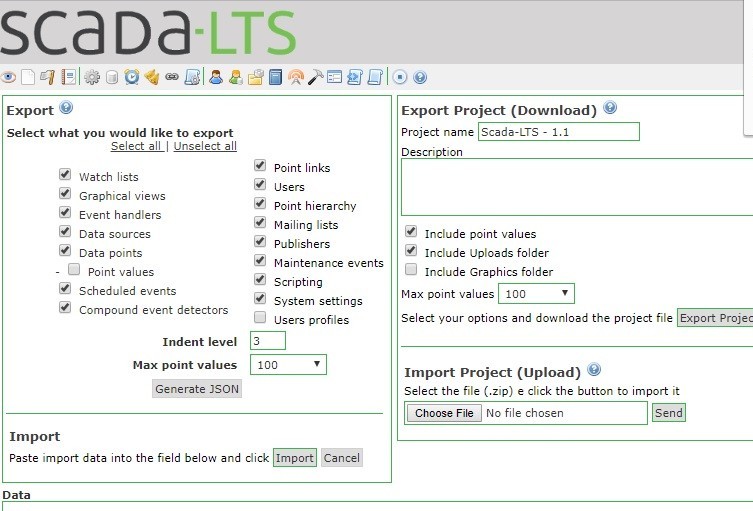
The vulnerability resides in the Common.getHomeDir function (in ZIPProjectManager.java, Project Import component). It allows manipulated input (path parameters) to result in a path traversal. The code incorrectly handles file-path sanitization, meaning a malicious ZIP or project-import request can traverse outside the intended directory.
Technical Specifications
| Attribute | Details |
|---|---|
| CVE ID | CVE-2025-13791 |
| Vulnerability Type | Path Traversal (CWE: Improper Limitation of a Pathname to a Restricted Directory) |
| Affected Component | Common.getHomeDir in br/org/scadabr/vo/exporter/ZIPProjectManager.java (Project Import) |
| Affected Versions | Scada-LTS up to 2.7.8.1 |
| Attack Vector | Network (Remote) |
| Authentication | May not be required depending on configuration |
| Exploitability | Remote — no need for local access. Public exploit code already available |
| Vendor Response | Vendor was contacted at disclosure time — reportedly did not respond |
Technical Details
Vulnerability Mechanism
- Vulnerable Function:
Common.getHomeDirin the Project Import component - Root Cause: Incorrect handling of file-path sanitization
- Attack Method: Crafted project-import request (e.g., malicious ZIP file or manipulated parameters)
- Result: System writes or reads files outside the intended project directory
What Can Be Accessed
- System configuration files
- Credentials
- Logs
- Other sensitive files on the server
Attack Scenario
-
Initial Attack: An attacker sends a crafted project-import request (e.g., malicious ZIP file or manipulated parameters) to the Scada-LTS Project Import feature.
-
Path Traversal: Because of the path-traversal bug, the system writes or reads files outside the intended project directory.
-
File System Access: Attacker gains access to:
- System configuration files
- Credentials
- Logs
- Other sensitive files on the server
-
Further Exploitation: Once file system access is gained, attacker may:
- Further pivot
- Extract credentials or configs
- Compromise SCADA system integrity or availability
-
Remote Execution: No local privileges required — so if the SCADA server is exposed (Internet-connected / reachable), attacker can exploit from anywhere.
Impact Assessment
- Access to sensitive configuration, credential files, internal data
- Exposure of SCADA system architecture and credentials
- Malicious modification of configuration or project files
- Possibly subverting monitoring or control logic
- Corruption of files or configuration could disrupt SCADA service
- Disruption of SCADA service or cause control failures
- Potential physical-system misbehavior
- In industrial/OT context — misuse of SCADA access may cause physical-system misbehavior
- If the attacker leverages credentials or configs
- With credentials or config data exposed, attacker might pivot to other internal systems
- Access to networks, controllers, or other critical infrastructure
Mitigations
🌐 Network Isolation
- Do not expose Scada-LTS Project-Import (ZIP import) functionality to untrusted or public networks
- Isolate SCADA interface behind firewall, VPN or air-gap
- Limit to trusted internal network only
🔒 Access Control
- Restrict access: Only allow access to trusted administrators
- Enforce strong authentication and least-privilege for project import
📊 Audit / Monitor
- Log and monitor any file reads/writes outside the expected directory
- Detect anomalous directory traversal or config access
🔄 Patch / Update
- Apply vendor / community patch if/when released
- Since vendor reportedly didn't respond, monitor official project or community forks for a fix
🛡️ Compensating Controls
- Wrap the import feature in additional security layers:
- Sandboxing
- Chroot/jail
- Restrict write permissions
- Disable project-import entirely if not needed
🏗️ Network Segmentation
- Ensure SCADA/OT is separated from general IT network
- Implement OT-IT separation best practices
💾 Backup & Validation
- Have backups of configurations
- Validate integrity
- After patching — verify no malicious files or altered configs exist