Trust Wallet Chrome Extension Supply-Chain Attack
Supply Chain Attack Browser Extension $7M Stolen Cryptocurrency Theft
Overview
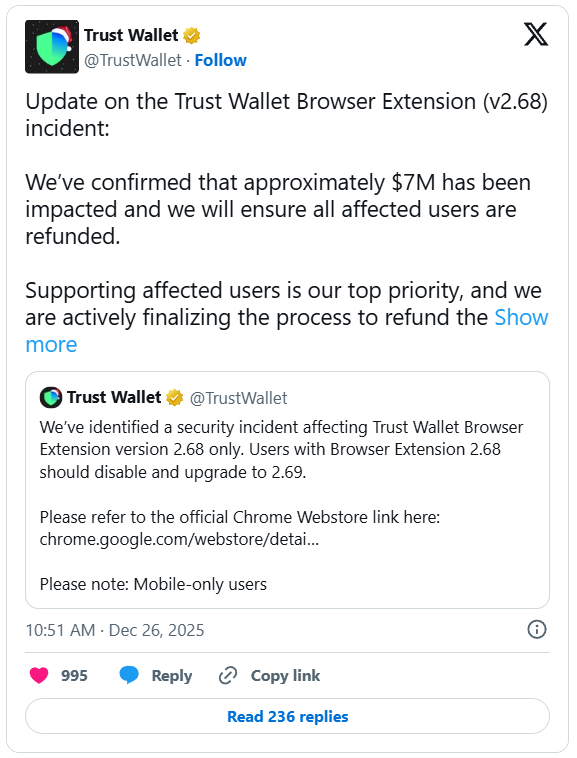
Trust Wallet confirmed that a malicious update to its Chrome browser extension (version 2.68) was distributed via the official Chrome Web Store, resulting in approximately $7 million in stolen cryptocurrency. The compromised extension contained injected malicious JavaScript code that executed when users unlocked their wallets, exfiltrating seed phrases and private keys to attacker-controlled servers disguised as analytics traffic. Once credentials were stolen, attackers signed legitimate blockchain transactions to drain funds from victim wallets across multiple blockchains. The attack affected hundreds of wallets, with victims facing permanent loss of funds due to the irreversible nature of cryptocurrency transactions. Critically, the core Trust Wallet mobile app and backend infrastructure were not compromised—the attack was isolated to the browser extension supply chain. A patched version (v2.69) was released to remove the malicious code, but victims who had already unlocked wallets under v2.68 were already compromised.
Incident Specifications
| Attribute | Details |
|---|---|
| Affected Product | Trust Wallet Chrome Browser Extension |
| Compromised Version | v2.68 (malicious update) |
| Patched Version | v2.69 (malicious code removed) |
| Distribution Platform | Google Chrome Web Store (official distribution channel) |
| Attack Type | Supply Chain Attack, Browser Extension Compromise |
| Attack Vector | Malicious JavaScript injection into official extension update |
| Data Stolen | Seed phrases (mnemonic phrases), private keys |
| Financial Loss | Approximately $7 Million USD in cryptocurrency |
| Affected Users | Hundreds of wallet users across multiple blockchains |
| Blockchains Impacted | Bitcoin, Ethereum, Binance Smart Chain, and others supported by extension |
| Mobile App Status | NOT compromised (attack isolated to browser extension) |
| Backend Status | NOT compromised (Trust Wallet infrastructure secure) |
| Exfiltration Method | Disguised as analytics traffic to attacker-controlled servers |
| Fund Theft Mechanism | Legitimate blockchain transactions signed with stolen private keys |
| Recovery Possibility | None (cryptocurrency transactions irreversible) |
Technical Details
Supply Chain Compromise
The attack exploited the browser extension update mechanism:
- Chrome Web Store Distribution: Malicious code distributed through official Chrome Web Store update channels, bypassing user awareness and browser security warnings
- Version 2.68 Injection: Attackers successfully injected malicious JavaScript into Trust Wallet extension codebase, either by:
- Compromising developer accounts with access to Chrome Web Store publishing
- Infiltrating build pipeline to inject code during compilation/packaging
- Social engineering developers to include malicious dependencies
- Automatic Updates: Chrome automatically updates extensions in background, meaning users received malicious version without manual intervention or consent
- Official Appearance: Extension maintained all legitimate metadata, signing, and branding, making detection by users nearly impossible
Malicious Code Functionality
The injected JavaScript implemented sophisticated key exfiltration:
- Execution Trigger: Malicious code activated when users unlocked wallet or initiated transactions, ensuring user activity and legitimate wallet access
-
Key Capture: Code intercepted:
- Seed phrases (12-24 word mnemonic phrases used for wallet recovery)
- Private keys (cryptographic keys for signing transactions)
- Wallet addresses (to identify target wallets with significant balances)
- User interactions (to confirm wallet actively used)
-
Obfuscation: Code likely used:
- String encoding (Base64, hex) to hide malicious URLs and commands
- Dead code injection (non-functional code to bloat file and hide malicious segments)
- Dynamic code loading (fetch additional payloads at runtime from external sources)
- API mimicry (disguised as legitimate wallet operations or analytics)
Data Exfiltration
Stolen credentials transmitted using evasion techniques:
- Analytics Disguise: Exfiltration traffic disguised as legitimate analytics data (common behavior for browser extensions), avoiding detection by security tools
- HTTPS Encryption: Data sent via encrypted HTTPS connections to attacker-controlled servers, preventing network inspection
- Legitimate-Looking Domains: Attacker infrastructure may have used domains resembling analytics services (e.g.,
trust-analytics[.]com,wallet-metrics[.]net) - Batched Transmission: Data possibly batched and sent periodically rather than immediately, reducing detection likelihood
- Command & Control: Attacker servers may have provided instructions for targeted high-value wallet draining
Fund Theft Mechanism
Attackers used legitimate blockchain protocols for theft:
- Private Key Usage: With stolen private keys, attackers had complete control over victim wallets—no exploitation required, just legitimate transaction signing
- Transaction Creation: Attackers created legitimate blockchain transactions transferring funds from victim wallets to attacker-controlled addresses
-
Multi-Chain Theft: Funds stolen from multiple blockchain networks simultaneously:
- Ethereum (ETH and ERC-20 tokens)
- Binance Smart Chain (BNB and BEP-20 tokens)
- Bitcoin (BTC)
- Other supported chains (Polygon, Arbitrum, Optimism, etc.)
-
Rapid Draining: Once keys obtained, attackers likely drained wallets immediately to maximize theft before victims noticed or migrated funds
- Laundering: Stolen cryptocurrency laundered through:
- Mixer services (Tornado Cash, CoinJoin)
- Decentralized exchanges (Uniswap, PancakeSwap)
- Cross-chain bridges (to obscure transaction trails)
- Privacy coins (Monero, Zcash) for final conversion
Attack Scenario
Step-by-Step Compromise
-
Supply Chain Infiltration
Attackers compromised Trust Wallet's extension publishing process. Potential vectors: compromised developer account credentials (phishing, credential stuffing), infiltrated CI/CD pipeline (injecting code during build process), or malicious insider. Injected malicious JavaScript into extension codebase without detection by code review or automated security scans. -
Malicious Update Distribution
Trust Wallet version 2.68 published to Chrome Web Store with malicious code embedded. Google's automated security scanning failed to detect malicious payload (due to obfuscation and analytics disguise). Extension update approved and pushed to all users. Chrome automatically updated extension in background—users received malicious version without awareness or consent. -
User Wallet Access
Victim users opened Chrome browser with Trust Wallet extension installed. Users clicked extension icon and unlocked wallet with password or biometric authentication. Legitimate wallet interface loaded normally—no visual indicators of compromise. Users conducted normal activities: checking balances, viewing transaction history, or initiating transfers. -
Key Exfiltration
Upon wallet unlock, malicious code activated. Code accessed wallet storage containing encrypted seed phrases and private keys. Since user had unlocked wallet, encryption keys available in memory. Malicious code decrypted and captured seed phrases/private keys. Data transmitted to attacker-controlled servers disguised as analytics telemetry via HTTPS. Victim unaware—no error messages, no performance degradation, no visual anomalies. -
Automated Fund Theft
Attacker infrastructure received stolen credentials. Automated scripts generated legitimate blockchain transactions using stolen private keys. Transactions transferred all available cryptocurrency (ETH, BTC, BNB, tokens) to attacker wallets. Transactions submitted to blockchain networks and confirmed within minutes. Victim wallets drained across multiple chains simultaneously. -
Victim Discovery
Hours to days later, victims checked wallets and discovered unauthorized transactions and zero balances. Victims reported thefts to Trust Wallet support. Trust Wallet investigated, identified malicious code in v2.68. Emergency response initiated: malicious version removed from Chrome Web Store, patched v2.69 published, public warning issued. Victims unable to recover funds—blockchain transactions irreversible. -
Fund Laundering
Attackers immediately began laundering $7 million in stolen cryptocurrency. Funds moved through multiple wallet addresses (peel chains), decentralized exchanges (swapping to privacy coins), mixer services (Tornado Cash for ETH), and cross-chain bridges (obscuring blockchain trail). Final destination: privacy-focused coins (Monero) or cash-out via shady exchanges. Law enforcement faces significant challenges tracing funds through decentralized infrastructure.
Impact Assessment
- Approximately $7 million USD in cryptocurrency permanently lost by victims.
- Individual losses range from hundreds to hundreds of thousands of dollars depending on wallet holdings.
- No insurance or fraud protection for cryptocurrency—victims cannot recover funds through chargebacks, reversals, or legal proceedings.
- Blockchain immutability means stolen funds irretrievable.
- Victims face financial hardship, especially those storing life savings or business capital in wallets.
- Potential tax implications for victims reporting theft losses.
- Stolen seed phrases and private keys represent complete compromise of wallet identities.
- Attackers possess permanent access to victim wallets even after funds drained—can monitor all future deposits.
- Victims must abandon compromised wallet addresses entirely.
- Seed phrase reuse (across multiple wallets or exchanges) extends compromise to related accounts.
- Victims' blockchain transaction history exposed, revealing financial activity, trading patterns, and wallet associations.
- Potential for targeted phishing using stolen identity information.
- Trust Wallet, one of world's most popular cryptocurrency wallets, suffered major reputational damage.
- User trust in browser extension security undermined.
- Competitors capitalize on incident, promoting alternative wallets.
- Trust Wallet faces potential legal liability from affected users.
- Media coverage negatively impacts parent company Binance (Trust Wallet owned by Binance).
- Incident highlights systemic vulnerabilities in browser extension supply chains and cryptocurrency custody solutions.
- Regulatory scrutiny likely intensifies.
- Incident demonstrates vulnerability of software-based cryptocurrency wallets to supply chain attacks.
- Users question safety of browser extensions for managing crypto assets.
- Increased adoption of hardware wallets (Ledger, Trezor) as more secure alternatives.
- Browser extension developers face heightened security expectations.
- Google Chrome Web Store security processes under scrutiny.
- Incident fuels arguments for stricter cryptocurrency custody regulations.
Mitigation Strategies
Immediate Actions (For Affected Users)
- Remove Extension v2.68 Immediately: Open Chrome → Extensions → Locate Trust Wallet → Remove (do not just disable). Verify removal by checking extension list again.
- Update to Patched Version (v2.69): If continuing to use Trust Wallet extension, only install from official Chrome Web Store after verifying v2.69 or later. Check Trust Wallet official website and social media for confirmation of safe version.
- Create New Wallets with Fresh Seeds: Do NOT reuse compromised seed phrases. Generate completely new wallets with new seed phrases on secure devices. Use hardware wallet or official mobile app (confirmed uncompromised).
- Migrate Remaining Funds: If any funds remain in compromised wallets, immediately transfer to new secure wallets. Use alternative device (mobile app, hardware wallet) for transfer—do not use compromised browser extension.
- Monitor Blockchain Activity: Track compromised wallet addresses on blockchain explorers (Etherscan, BscScan, Blockchain.com). Alert on any new deposits to prevent further losses. Consider setting up monitoring alerts.
Long-Term Security Measures
- Hardware Wallet Migration: Transition to hardware wallets (Ledger Nano X, Trezor Model T) for storing significant cryptocurrency holdings. Hardware wallets isolate private keys in secure elements, immune to software-based attacks.
- Multi-Signature Wallets: Use multi-sig wallets requiring multiple approvals for transactions. Prevents single point of failure—compromise of one key insufficient for fund theft. Services: Gnosis Safe (Ethereum), Casa (Bitcoin).
- Avoid Browser Extensions for High-Value Storage: Use browser extensions only for small amounts and daily transactions. Store significant holdings in hardware wallets or cold storage. Follow "hot wallet / cold wallet" best practice.
- Seed Phrase Security: Store seed phrases offline only:
- Metal backup (fireproof/waterproof metal plates)
- Paper in secure safe or bank safety deposit box
- Never digital storage (no cloud, no photos, no password managers)
- Never enter on websites claiming to "validate" or "recover" wallets
Monitoring and Detection
- Extension Audit: Regularly review installed Chrome extensions. Remove unused or unnecessary extensions. Verify extension publishers match official developers. Check extension permissions—be suspicious of excessive data access requests.
- Transaction Alerts: Enable wallet transaction notifications (if available). Use blockchain monitoring services (Etherscan alerts, Bloxy) to receive instant notifications of outbound transactions.
- Permission Review: When extensions request new permissions during updates, carefully review. Deny permissions unrelated to core functionality. Extensions accessing "all website data" or "clipboard" pose risks.
- Version Verification: Before unlocking wallet after extension update, check Trust Wallet social media and website for security advisories. Community forums often report suspicious updates quickly.
For Chrome Extension Ecosystem
-
Enhanced Security Review: Google must improve Chrome Web Store security vetting:
- Source code review for high-risk extensions (financial, cryptocurrency, password managers)
- Behavioral analysis in sandbox environments detecting exfiltration patterns
- Cryptographic signing with hardware-backed developer keys
- Mandatory 2FA for extension developer accounts
-
Update Transparency: Implement user-visible update notes for security-sensitive extensions. Require explanations for permission changes. Delay automatic updates for high-risk categories, allowing user review.
- Security Warnings: Display warnings when extensions access clipboard, storage, or network during sensitive operations (password entry, wallet unlocking).
- Rapid Response: Establish 24/7 security operations for emergency extension takedowns. Publish post-incident transparency reports.
For Cryptocurrency Wallet Providers
-
Supply Chain Security: Implement rigorous development security:
- Code signing with hardware security modules (HSMs)
- Multi-person release authorization (no single developer can publish)
- Automated security scanning in CI/CD pipeline (static analysis, dependency checks)
- Bug bounty programs encouraging external security research
-
Extension Architecture: Redesign extensions to minimize attack surface:
- Never store unencrypted keys in extension storage (even temporarily)
- Hardware security key integration (FIDO2) for wallet unlocking
- Transaction signing offloaded to mobile app or hardware wallet (extension acts as viewer only)
- Content Security Policy (CSP) preventing inline script execution
Resources
Incident Coverage
- Trust Wallet Confirms Extension Hack Led to $7 Million Crypto Theft — BleepingComputer
- Trust Wallet Chrome Extension Breach Caused $7 Million Crypto Loss via Malicious Code — The Hacker News
- Trust Wallet Warns Users to Update Chrome Extension After $7M Security Loss
- Hidden script caught harvesting private keys as Trust Wallet issues emergency warning for Chrome users
- Crypto Security Warning: Trust Wallet Confirms $7 Million Chrome Hack
- Trust Wallet Hack Hits Hundreds, $7 Million Stolen in Browser Extension Breach
- Trust Wallet Chrome Extension Hack Exposes $7M Theft