Fortinet FortiOS SSL VPN 2FA Bypass (CVE-2020-12812)

CVE-2020-12812 CVSS 7.7 Authentication Bypass 2FA Bypass Fortinet
Overview
Threat actors are actively exploiting a five-year-old authentication bypass vulnerability in Fortinet FortiOS SSL VPN that allows attackers to circumvent two-factor authentication (2FA) and gain unauthorized access to protected VPN endpoints. CVE-2020-12812 is an improper authentication flaw where FortiOS treats usernames as case-sensitive, while LDAP (Lightweight Directory Access Protocol) directories typically are case-insensitive. This discrepancy creates an authentication logic flaw: when attackers submit valid credentials with altered username casing (e.g., "Admin" instead of "admin"), FortiOS fails to match the local user account (which has 2FA enabled) and instead falls back to LDAP authentication, which does not enforce 2FA. The vulnerability affects misconfigured FortiGate devices where local users with 2FA are linked to LDAP, and the same users exist in LDAP groups configured in authentication policies for SSL VPN or IPsec VPN. Despite being patched in 2020, the flaw remains exploited in 2025 due to widespread unpatched deployments and persistent misconfigurations. Fortinet has issued warnings about active exploitation in the wild, with attackers leveraging the bypass to gain VPN access, administrative privileges, and establish persistence for lateral movement within enterprise networks. The vulnerability underscores risks of legacy vulnerabilities in internet-facing infrastructure and authentication configuration weaknesses.
Vulnerability Specifications
| Attribute | Details |
|---|---|
| CVE ID | CVE-2020-12812 |
| CVSS Score | 9.8 (Critical) |
| CWE Classification | CWE-287: Improper Authentication |
| Vulnerability Type | Authentication Bypass, 2FA Bypass, Logic Flaw |
| Affected Product | Fortinet FortiOS (FortiGate devices) |
| Affected Component | SSL VPN, IPsec VPN authentication |
| Affected Versions | FortiOS 6.4.0, 6.2.0 - 6.2.3, 6.0.9 and earlier |
| Patched Versions | FortiOS 6.4.1+, 6.2.4+, 6.0.10+ |
| Attack Vector | Network (remote exploitation via VPN login interface) |
| Attack Complexity | Low (requires valid username/password but exploits logic flaw) |
| Privileges Required | Low (valid LDAP credentials, no 2FA token needed) |
| User Interaction | None |
| Scope | Changed (attacker gains access beyond authentication boundary) |
| Confidentiality Impact | High (full VPN access, potential data exposure) |
| Exploit Availability | Active exploitation confirmed (2025) |
| Patch Date | 2020 (FortiOS 6.0.10, 6.2.4, 6.4.1 releases) |
| Disclosure Date | July 2020 |
| Exploitation Timeline | 5 years post-disclosure (2020 - 2025) |
| Configuration Req. | Misconfiguration: Local users with 2FA + LDAP group policies |
| Authentication Method | SSL VPN, IPsec VPN |
| LDAP Integration | Required (vulnerability exploits LDAP case-insensitivity) |
Technical Details
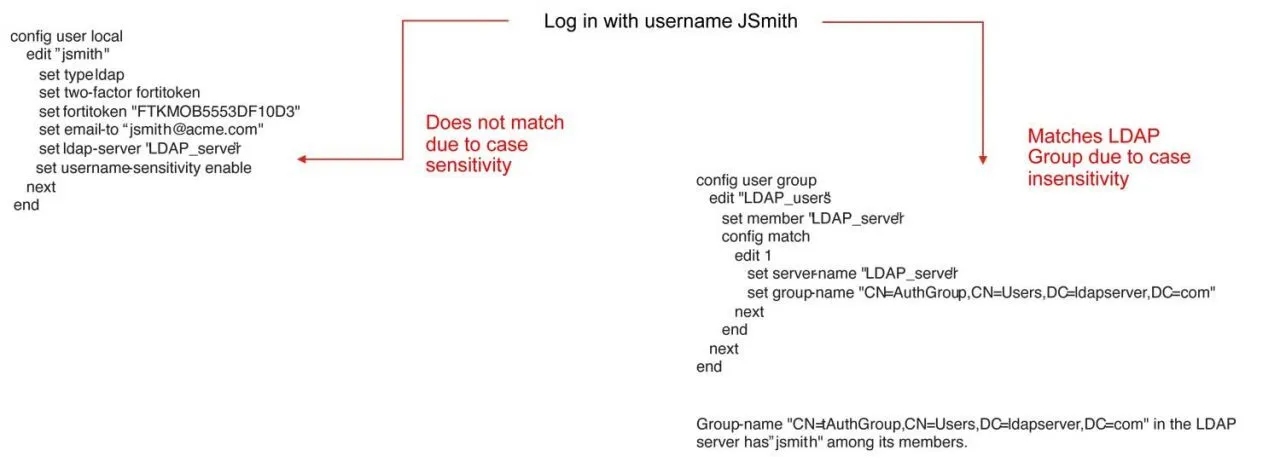
Root Cause: Case Sensitivity Mismatch
CVE-2020-12812 stems from inconsistent username handling between FortiOS and LDAP:
- FortiOS Behavior: FortiOS treats usernames as case-sensitive when matching local user accounts
- Local user account "admin" ≠ "Admin" ≠ "ADMIN" in FortiOS internal database
-
Each casing variant treated as distinct username
-
LDAP Behavior: LDAP directories (Active Directory, OpenLDAP) typically treat usernames as case-insensitive
- "admin", "Admin", "ADMIN" all resolve to same LDAP user object
- LDAP bind operations succeed regardless of username casing if password correct
Authentication Flow in Vulnerable Configurations
In misconfigured FortiGate devices with local users + LDAP integration:
Normal Authentication (Correct Case)
- User submits credentials: Username "admin", password "P@ssw0rd"
- FortiOS local database lookup: Exact match found for "admin"
- 2FA enforcement: FortiOS detects local user has 2FA enabled
- 2FA prompt: User must provide token (TOTP, SMS, hardware token)
- Successful authentication: After 2FA verification, VPN access granted
Exploited Authentication (Altered Case)
- Attacker submits credentials: Username "Admin" (capital A), password "P@ssw0rd"
- FortiOS local database lookup: No exact match for "Admin" (only "admin" exists)
- Fallback to LDAP: FortiOS attempts LDAP authentication for "Admin"
- LDAP authentication succeeds: LDAP case-insensitively matches "Admin" → "admin", password verified
- LDAP group policy applied: User in LDAP group with VPN access policy
- 2FA bypassed: LDAP authentication path does not enforce local user's 2FA requirement
- Unauthorized access granted: Attacker gains VPN access without 2FA token
Vulnerable Configuration Elements
The vulnerability requires specific misconfigurations to be exploitable:
-
Local User with 2FA: User account created in FortiOS local database with 2FA enabled
config user local edit "admin" set type password set two-factor fortitoken next end -
Same Username in LDAP: Matching user exists in LDAP directory (Active Directory, OpenLDAP)
-
LDAP user:
cn=admin,ou=Users,dc=example,dc=com -
LDAP Group Policy: LDAP group containing user is referenced in authentication policy
config user group edit "vpn-users-ldap" set member "ldap-server" config match edit 1 set server-name "ldap-server" set group-name "CN=VPN Users,OU=Groups,DC=example,DC=com" next end next end -
VPN Policy Using LDAP Group: SSL/IPsec VPN policy allows LDAP group without enforcing local 2FA
config vpn ssl settings
    set source-interface "wan1"
    set source-address "all"
    config authentication-rule
        edit 1
            set groups "vpn-users-ldap"
            set portal "full-access"
        next
    end
end
Authentication Logic Flaw
The vulnerability exploits FortiOS authentication decision tree:
Incoming VPN authentication attempt
    ↓
Check local user database (case-sensitive)
    ↓
    ├── Match found → Enforce local user settings (2FA required)
    ↓
    └── No match → Fallback to LDAP authentication
        ↓
        LDAP bind attempt (case-insensitive)
        ↓
        ├── LDAP bind success → Check LDAP group policies
        │   ↓
        │   └── User in authorized LDAP group → Grant access (NO 2FA)
        ↓
        └── LDAP bind failure → Deny access
Attacker manipulates case to force "No match" path, bypassing local 2FA enforcement.
Case Variation Examples
Attackers test multiple case permutations:
| Original Username | Case Variations | LDAP Match | 2FA Bypassed |
|---|---|---|---|
| admin | Admin, ADMIN, aDmIn | Yes | Yes |
| jsmith | JSmith, JSMITH, jSmith | Yes | Yes |
| vpnuser | VpnUser, VPNUSER, VPNuser | Yes | Yes |
Automated tools iterate through common case patterns to identify exploitable accounts.
Attack Scenario
Step-by-Step Exploitation
-
Reconnaissance: Target Identification
Attacker identifies Fortinet FortiGate SSL VPN endpoints exposed to internet via:- Port scanning: Ports 443/tcp (HTTPS), 10443/tcp (SSL VPN)
- Service fingerprinting: Banner grabbing reveals "FortiGate" in HTTP headers or login page
- Search engines: Shodan, Censys queries:
product:"FortiGate","FortiGate SSL-VPN" - Mass scanning: Automated tools scan entire IP ranges for FortiGate VPN portals
Attacker identifies target:
https://vpn.targetcompany.comrunning FortiOS. -
Credential Acquisition
Attacker obtains valid LDAP credentials via:- Phishing: Spear-phishing campaigns targeting employees to steal domain credentials
- Credential stuffing: Testing leaked passwords from data breaches against LDAP usernames
- Password spraying: Common passwords ("Welcome2025", "CompanyName123") against known usernames
- Prior breach: Credentials from earlier network compromise or insider threat
Attacker acquires: Username "admin", Password "P@ssw0rd!2025".
-
Vulnerability Testing: Case Variation
Attacker tests case-altered username to probe for CVE-2020-12812:- Navigate to SSL VPN login portal:
https://vpn.targetcompany.com - Test #1: Submit "admin" (lowercase) → Prompted for 2FA token → Indicates local user with 2FA
- Test #2: Submit "Admin" (capital A) with same password → No 2FA prompt → Successful login
Confirmation: Device vulnerable, 2FA bypass successful via case alteration.
- Navigate to SSL VPN login portal:
-
Authentication Bypass
Attacker authenticates using altered case credentials:- Username: Admin (or ADMIN, aDmIn, etc.)
- Password: P@ssw0rd!2025
- FortiOS fails to match local "admin" account (case mismatch)
- FortiOS falls back to LDAP authentication
- LDAP authenticates "Admin" case-insensitively → Binds successfully
- LDAP group membership verified: User in "VPN Users" group
- VPN access granted without 2FA → Attacker receives VPN IP, tunnel established
-
VPN Access Established
Attacker now has remote network access:- VPN tunnel active: Attacker assigned internal IP (e.g., 10.10.10.50)
- Network routes pushed: Access to internal subnets (10.0.0.0/8, 192.168.0.0/16)
- DNS resolution: Internal DNS servers accessible
- Bypassed perimeter defenses: Firewall, IDS/IPS bypassed via legitimate VPN tunnel
Attacker operates as authenticated insider from external location.
-
Privilege Escalation (If Admin User)
If compromised account has administrative privileges:- Access FortiGate management interface:
https://vpn.targetcompany.com:443(admin portal) - Login with same case-altered credentials: "Admin" / password
-
Gain full FortiGate administrative access:
- Modify firewall rules to allow unrestricted traffic
- Disable security features (IPS, antivirus, web filtering)
- Extract VPN credentials for all users
- Create backdoor accounts for persistence
- Access VPN logs (identify active users, connection times)
- Access FortiGate management interface:
-
Internal Reconnaissance
Attacker performs network reconnaissance from VPN session:- Network scanning: Nmap scans of internal IP ranges to identify live hosts
- Service enumeration: Identify SMB shares, databases, web servers, domain controllers
- Active Directory enumeration: Use BloodHound, PowerView to map AD structure
- Credential harvesting: Deploy Mimikatz, Impacket to extract credentials from accessible systems
Attacker identifies: Domain controller at 10.0.0.10, file server at 10.0.0.20, database at 10.0.0.30.
-
Lateral Movement
Using VPN access as pivot point:- SMB exploitation: Access file shares using compromised credentials
- Pass-the-Hash: Use harvested NTLM hashes to authenticate to additional systems
- RDP/SSH: Remote desktop to workstations and servers
- Exploit internal vulnerabilities: Target unpatched systems (EternalBlue, ZeroLogon)
- Move toward high-value targets: Domain controllers, backup servers, financial databases
-
Data Exfiltration
Attacker exfiltrates sensitive data through VPN tunnel:- Intellectual property: Source code, design documents, patents
- Financial data: Accounting databases, transaction records
- Customer information: PII, payment card data, email addresses
- Credentials: Password databases, SSH keys, API tokens
- Exfiltration method: Data transferred through VPN tunnel to attacker's infrastructure (appears as legitimate VPN traffic)
-
Persistence and Backdoors
Attacker establishes long-term access:- Create backdoor VPN accounts: Add new local/LDAP users for future access
- Webshells: Deploy webshells on internal web servers
- C2 implants: Install Cobalt Strike beacons, Metasploit agents on compromised hosts
- Scheduled tasks: Create persistence mechanisms on Windows systems
- Maintain VPN access: Continue using case-altered credentials until detected or patched
Impact Assessment
Successful 2FA bypass grants attackers full VPN access to internal networks, exposing sensitive data:
- Internal network visibility: Attacker can access any internal resource reachable via VPN (file shares, databases, applications)
- Data exfiltration: Intellectual property, financial records, customer data, employee information stolen
- Credential theft: Attackers harvest additional credentials from internal systems, escalating access
- Administrative access: If admin accounts compromised, attacker gains full FortiGate configuration access, exposing all VPN users, firewall policies, IPsec tunnels, and security settings
Confidentiality breach extends beyond initial compromise to entire network reachable via VPN.
While vulnerability primarily enables authentication bypass, follow-on actions threaten integrity:
- Configuration tampering: Attackers with admin access modify firewall rules, disable security features, alter VPN policies
- Backdoor creation: New accounts, modified policies ensure persistent access
- Log manipulation: Attackers delete authentication logs to hide exploitation
- Malware deployment: Ransomware, wipers, or trojans installed on internal systems
- Data modification: Attackers alter financial records, customer data, or operational databases for fraud
Integrity impact indirect but significant in multi-stage attacks.
Direct availability impact limited, but post-exploitation actions can cause disruption:
- Ransomware deployment: Attackers leverage VPN access to deploy ransomware network-wide, encrypting critical systems
- Resource exhaustion: VPN tunnel used for excessive traffic, DDoS attacks, or cryptomining
- Service disruption: Attackers delete configurations, shut down services, or deploy destructive malware
- Incident response overhead: Investigation and remediation require VPN downtime, network segmentation changes
Availability typically impacted in later attack stages, not during initial bypass.
Attacker gains access beyond intended authentication boundary:
- Perimeter bypass: Attacker circumvents VPN 2FA intended to protect network perimeter
- Insider access: External attacker operates as authenticated insider with network access
- Expanded attack surface: All internal systems reachable via VPN now accessible
- Trust exploitation: VPN access often grants elevated privileges or access to sensitive zones
Scope change from external unauthenticated attacker to internal authenticated user represents critical security boundary breach.
Mitigation Strategies
Immediate Patching (Critical)
-
Apply FortiOS Security Updates: Update to patched FortiOS versions immediately:
- FortiOS 6.0.x: Upgrade to 6.0.10 or later
- FortiOS 6.2.x: Upgrade to 6.2.4 or later
- FortiOS 6.4.x: Upgrade to 6.4.1 or later
- FortiOS 7.x: Upgrade to latest stable release (all 7.x versions include fix)
-
Patch Verification: After update, verify CVE-2020-12812 addressed:
- Check FortiOS release notes for CVE-2020-12812 mention
- Test authentication with case-altered usernames (should enforce 2FA regardless)
- Review FortiGate system logs for patch application confirmation
-
Emergency Patching Process: Prioritize SSL VPN-enabled devices:
- Identify all FortiGate devices with SSL VPN or IPsec VPN enabled
- Schedule emergency maintenance windows for patching
- Test patches in lab environment before production deployment
- Coordinate with stakeholders for minimal business disruption
Configuration Hardening
-
Disable Username Case Sensitivity: Configure FortiOS to treat usernames case-insensitively:
This prevents case-altered usernames from bypassing local user matching.config system global set auth-username-case-insensitive enable end -
Eliminate Dual Authentication Paths: Remove configuration overlap between local users and LDAP group policies:
- Option A: Use only local users with 2FA for VPN access (remove LDAP group policies)
- Option B: Use only LDAP authentication with LDAP-enforced 2FA (remove local users from VPN policies)
- Avoid: Configurations where same username exists in both local database and LDAP with different security policies
-
Enforce 2FA at Multiple Layers: Enable 2FA enforcement at policy level:
This ensures all VPN access requires 2FA regardless of authentication source.config vpn ssl settings config authentication-rule edit 1 set auth-method two-factor next end end -
LDAP Attribute Mapping: Configure LDAP to enforce 2FA via attributes:
- Use LDAP attributes (e.g.,
mfaRequired=TRUE) to determine 2FA enforcement - Map LDAP 2FA attribute to FortiGate authentication policies
- Use LDAP attributes (e.g.,
Access Control Hardening
-
Limit VPN User Scope: Apply principle of least privilege:
- Create separate LDAP/local groups for VPN access vs. general users
- Only grant VPN access to users who require remote access
- Remove administrative accounts from VPN authentication policies (admins should access management interface separately, not via SSL VPN)
-
Implement Network Segmentation: Restrict VPN access to specific zones:
- Create separate VPN portals for different access levels (user VPN, admin VPN)
- Apply firewall policies limiting VPN users to only required resources
- Use VLAN segmentation to isolate VPN traffic from critical systems
-
Conditional Access Policies: Implement context-aware authentication:
- Require additional authentication factors for access from unknown IPs
- Enforce device posture checks (antivirus, disk encryption) before VPN access
- Implement geo-fencing (block VPN access from unexpected countries)
Monitoring and Detection
- Authentication Log Monitoring: Monitor FortiGate logs for exploitation indicators:
- Case-altered login attempts: Unusual username casing (e.g., "Admin" when user normally logs in as "admin")
- Successful LDAP logins without 2FA: Authentication success via LDAP without 2FA verification
- Repeated login attempts with variations: Multiple failed attempts followed by case-altered success
FortiOS log example:
logdesc="Authentication succeeded"
user="Admin"
authserver="ldap-server"
mfa_status="none"
-
SIEM Integration: Forward FortiGate logs to SIEM (Splunk, QRadar, Sentinel) for correlation:
- Create alerts for authentication events with username case mismatches
- Correlate VPN access with unusual network behavior (scanning, lateral movement)
- Alert on VPN logins from unexpected geolocations or times
-
Anomaly Detection: Baseline normal VPN usage and detect deviations:
- Alert on VPN access outside normal business hours
- Detect unusual data transfer volumes through VPN
- Flag connections to internal systems never previously accessed by user
-
Regular Audit of Linked Devices: Review FortiGate configurations:
- Weekly audit of local user accounts and LDAP group policies
- Verify no overlapping username configurations exist
- Check for unauthorized accounts or policy changes
Administrative Best Practices
-
Separate Admin Accounts: Do not use VPN-accessible accounts for administration:
- Create dedicated local admin accounts for FortiGate management
- Disable SSL VPN access for admin accounts
- Require admin access via dedicated management network or jump host
-
Principle of Least Privilege: Limit privileges for VPN users:
- VPN users should not have administrative rights on FortiGate
- Apply role-based access control (RBAC) within internal network
- Separate VPN access from privileged account management
-
Regular Configuration Reviews: Quarterly security audits:
- Review all authentication policies for misconfigurations
- Verify 2FA enforcement for all remote access
- Check for legacy configurations from pre-patch era
User and Admin Education
-
Security Awareness Training: Educate users on phishing and credential protection:
- Train users to recognize credential phishing attempts
- Emphasize importance of unique passwords for VPN access
- Report suspicious login notifications or unexpected 2FA prompts
-
Admin Training: Ensure IT staff understand authentication logic:
- Train administrators on proper FortiGate authentication configuration
- Educate on risks of mixing local and LDAP authentication
- Provide guidance on secure VPN deployment
Resources
Vendor Security Advisories