Telegram Proxy One-Click IP Exposure Vulnerability
Telegram IP Leak Privacy Bypass MTProto Proxy Deanonymization Mobile Security
Overview
Telegram, one of the world's most popular encrypted messaging applications with over 900 million active users globally, has a critical privacy vulnerability in its Android and iOS mobile clients that enables one-click IP address exposure through malicious MTProto proxy links.
The vulnerability resides in Telegram's implementation of MTProto proxy support, a feature designed to help users bypass internet censorship in restrictive countries (Russia, Iran, China, Belarus, Turkey) by allowing them to route Telegram traffic through trusted proxy servers. Telegram proxy links use the URL format https://t.me/proxy?server=<IP>&port=<PORT>&secret=<SECRET>, which users can share to quickly configure proxy connections without manual setup—a feature particularly valuable for activists, journalists, and dissidents operating under government surveillance and internet restrictions.
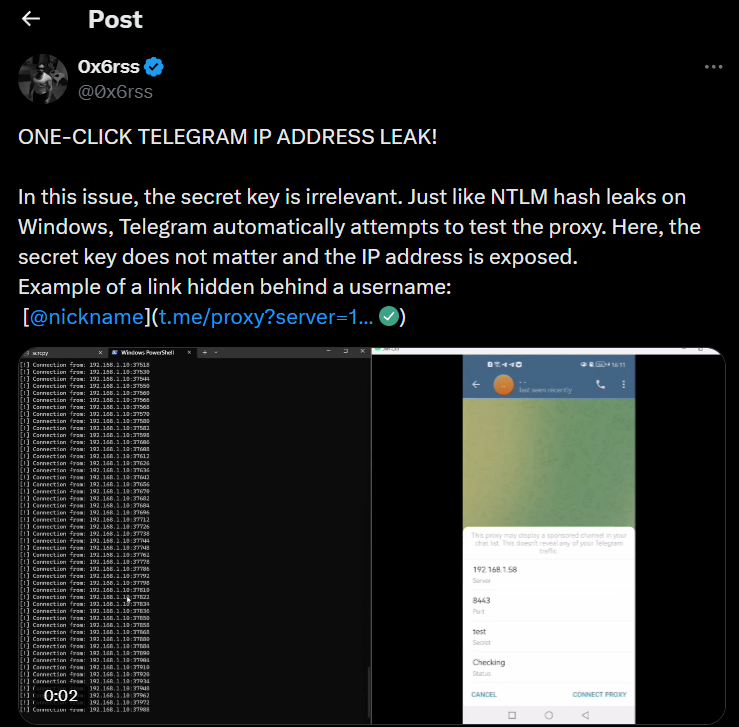
However, security researchers discovered that when a user on a mobile device (Android or iOS) taps a proxy link—even unintentionally—Telegram's mobile clients automatically perform a direct connection test to the specified proxy server to validate its availability before adding it to the proxy list or prompting the user. This automatic validation probe bypasses any configured proxies, VPNs, or Tor connections the user may have active, instead using the device's native network interface to send a test packet directly to the attacker-controlled server, thereby leaking the user's real public IP address to the malicious proxy operator. Attackers weaponize this behavior by disguising proxy links as seemingly innocuous elements within Telegram conversations—embedding them behind clickable usernames (using Telegram's custom URL scheme for usernames that can secretly contain proxy parameters), channel invites, inline bot responses, profile pictures, or group join links—tricking users into clicking without realizing they're interacting with a proxy configuration link.
The vulnerability is particularly dangerous because it requires no user authentication, no malware installation, and no permissions—a single misclick instantly reveals the user's identity. For users relying on Telegram's anonymity features in high-risk environments (political dissidents in authoritarian regimes, whistleblowers, human rights activists, investigative journalists, opposition leaders), this IP leak represents a life-threatening deanonymization attack that can enable government surveillance, location tracking, targeted harassment, arrest, or physical harm.
The vulnerability undermines Telegram's core privacy promise and affects hundreds of millions of mobile users who may unknowingly expose their real IP addresses through social engineering attacks, malicious channels, compromised groups, or coordinated disinformation campaigns that spread weaponized proxy links.
Security researchers warn that state-sponsored actors, law enforcement, and surveillance agencies in authoritarian countries are actively exploiting this technique to deanonymize activists and track dissidents, with reports of Telegram groups in Russia, Iran, and Belarus distributing disguised proxy links to identify opposition movement participants.
The vulnerability has been publicly disclosed as of January 2026, with Telegram acknowledging the issue and stating they plan to add user warnings when proxy links are clicked, but no fix has been deployed yet—leaving millions of users vulnerable to ongoing exploitation. The attack requires minimal technical sophistication (attackers only need to set up a simple MTProto proxy server and log incoming connection attempts), making it accessible to script kiddies, doxxing groups, stalkers, and nation-state surveillance programs alike.
Unlike traditional phishing or malware attacks, this IP leak is a design flaw in Telegram's mobile client networking logic, meaning users cannot protect themselves through traditional security measures—even security-conscious users with VPNs, firewalls, and Tor are vulnerable if they use Telegram's mobile apps.
The vulnerability does not affect Telegram Desktop (Windows, macOS, Linux desktop clients), which handle proxy links differently, nor does it affect Telegram Web (browser-based version)—the issue is exclusive to Android and iOS mobile apps, which represent the overwhelming majority of Telegram's user base. This disclosure comes amid growing concerns about Telegram's security practices, including ongoing debates about its encryption implementation, data retention policies, and cooperation with government requests—further eroding user trust in the platform as a secure communication tool for sensitive use cases.
Vulnerability Specifications
| Attribute | Details |
|---|---|
| Vulnerability Name | Telegram Proxy One-Click IP Address Exposure |
| Vulnerability Type | Privacy leak, deanonymization, information disclosure |
| Affected Software | Telegram for Android, Telegram for iOS |
| Affected Versions | All versions as of January 2026 (including latest releases) |
| Unaffected Platforms | Telegram Desktop (Windows, macOS, Linux), Telegram Web |
| Attack Vector | Malicious MTProto proxy link embedded in messages, usernames, channels |
| User Interaction | Required (user must click disguised proxy link) |
| Attack Complexity | Low (requires only basic web server setup and social engineering) |
| Privileges Required | None (attacker needs no special access or permissions) |
| Disclosure Date | January 12, 2026 |
| Public Exploit | Yes (proof-of-concept demonstrated by security researchers) |
| Patch Status | No fix deployed; Telegram plans to add user warnings (timeline unclear) |
| Workaround Available | Partial (system-wide VPN can mitigate but not eliminate risk) |
| Affected User Count | Hundreds of millions (Telegram mobile users globally) |
| Severity Assessment | High for at-risk users (activists, journalists), Medium for general users |
| Exploitation Status | Active exploitation suspected in authoritarian countries |
| Root Cause | Mobile client performs direct proxy validation bypassing VPN/proxy layers |
| Leaked Information | User's real public IP address, approximate geolocation, ISP information |
| Privacy Impact | Deanonymization of users relying on anonymity for safety |
| Threat Actors | Nation-state surveillance, law enforcement, doxxing groups, stalkers |
| Use Cases at Risk | Political dissidents, whistleblowers, activists, journalists, LGBTQ+ users |
| Telegram's Response | Acknowledged issue, plans to add warnings, no timeline for fix |
| Researcher Attribution | Cybersecurity researchers (disclosed via Cybernews, security media) |
Technical Details
MTProto Proxy Feature in Telegram
What is MTProto Proxy?
MTProto is Telegram's proprietary encryption protocol for client-server communication. MTProto proxies are special proxy servers that:
- Allow users to route Telegram traffic through an intermediary server
- Help bypass internet censorship and ISP-level Telegram blocking
- Provide a way to access Telegram in countries where it's banned or restricted
- Do not decrypt messages (maintain end-to-end encryption for Secret Chats)
How Telegram Proxies Work (normal operation):
User Device → MTProto Proxy Server → Telegram Servers

1. User configures proxy in Telegram settings
2. All Telegram traffic routed through proxy
3. Proxy forwards encrypted traffic to Telegram servers
4. ISP sees connection to proxy (not Telegram), bypassing blocks
5. Telegram servers see connection from proxy IP (not user's real IP)
Proxy Link Format
Telegram allows sharing proxy configurations via URLs:
Format:
https://t.me/proxy?server=<SERVER>&port=<PORT>&secret=<SECRET>

Example:
https://t.me/proxy?server=192.0.2.100&port=443&secret=ee1234567890abcdef1234567890abcdef1234567890abcdef1234567890abcd

Parameters:
- server: IP address or domain of MTProto proxy server
- port: TCP port (commonly 443, 80, 8080, 1080)
- secret: Hexadecimal secret for proxy authentication (32+ hex characters)
Intended User Flow:
- User receives proxy link (from trusted source, proxy provider, anti-censorship organization)
- User taps link in Telegram
- Telegram prompts: "Add proxy server 192.0.2.100:443?"
- User confirms → Proxy added to settings → User can enable it for connection
The Vulnerability: Automatic Direct Connection
What Actually Happens (on Android/iOS mobile clients):
When user taps proxy link:

1. Telegram mobile app receives link: t.me/proxy?server=ATTACKER_IP&port=443&secret=...

2. BEFORE showing user prompt or adding proxy:
   Telegram automatically sends test packet to validate proxy

3. Test connection logic:
   - Telegram creates NEW network socket
   - Socket uses device's DEFAULT network interface (not configured proxy/VPN)
   - Sends MTProto handshake probe to ATTACKER_IP:443
   - Packet includes: Source IP (user's real IP), timestamp, Telegram client info

4. Attacker's server logs:
   [2026-01-12 14:32:15] Connection from 203.0.113.50 (User's real IP)
   User-Agent: Telegram Android 10.5.0
   Geolocation: Moscow, Russia (inferred from IP)
   ISP: Rostelecom (Russian ISP)

5. Telegram receives validation result (success/failure)

6. NOW Telegram shows user prompt: "Add proxy?"
   (But damage already done—IP leaked in step 3)
Why This Bypasses VPN/Proxy:
Normal Telegram Traffic (with VPN enabled):
User Device → VPN Tunnel → VPN Server → Telegram Servers
(User's real IP hidden, VPN server IP visible)

Proxy Validation Traffic (THE VULNERABILITY):
User Device → [BYPASSES VPN] → Attacker's Proxy → Logs Real IP
(VPN/proxy ignored, device's native interface used directly)
What Gets Leaked:
Information exposed to attacker's proxy server:

1. Real Public IP Address:
   - User's ISP-assigned IP (not VPN IP)
   - Example: 203.0.113.50

2. Geolocation (inferred from IP):
   - Country: Russia
   - City: Moscow
   - Coordinates: ~55.7558° N, 37.6173° E (approximate)

3. ISP Information:
   - Provider: Rostelecom (Russian telecom)
   - ASN: AS12389
   - Connection type: Residential/Mobile

4. Device Information (from MTProto handshake):
   - Telegram version: Android 10.5.0
   - Operating system: Android 13
   - Timestamp: 2026-01-12 14:32:15 UTC

5. Network Metadata:
   - TCP/IP fingerprinting (OS detection via TTL, window size)
   - Latency (reveals proximity to server)
Attack Techniques: Disguising Proxy Links
Attackers hide proxy links behind seemingly innocent elements:
Technique 1: Username Disguise
Telegram allows custom URL schemes:

Normal username mention:
@john_doe

Malicious disguised proxy:
@innocent_looking_name
(Actually contains hidden t.me/proxy?... in internal link structure)

When user taps username expecting to see profile → IP leaked
Technique 2: Inline Bot Response
Attacker creates Telegram bot:

User sends query to bot: /search cat videos
Bot responds with inline result:
[🎬 Funny Cat Video]
(Button secretly contains proxy link instead of video URL)

User clicks expecting video → IP leaked
Technique 3: Channel/Group Invite
Malicious channel message:
"Join our privacy-focused group for secure communication:
[Join Secure Group] ← This button is actually a proxy link

User clicks to join group → IP leaked
Technique 4: Profile Picture/Media
Attacker posts image with caption:
"Click to view full resolution"
[View Image] ← Proxy link disguised as image viewer

User clicks → IP leaked
Technique 5: QR Code (combined attack)
Attacker posts QR code image in channel:
"Scan to configure secure Telegram proxy"

QR code encodes: tg://proxy?server=ATTACKER_IP&...

User scans QR → Telegram opens link → IP leaked
Attack Scenario
Step-by-Step IP Leak Exploitation
-
Target Identification
Attacker: Russian FSB (Federal Security Service) cyber surveillance unit
Objective: Deanonymize participants in opposition Telegram channel coordinating protests
Target Profile:- "Free Russia" Telegram channel with 50,000 subscribers
- Channel discusses anti-government protests, opposition coordination
- Many participants use VPNs to hide identity from government surveillance
- Key target: Channel admin "Alexei" (pseudonymous activist, real identity unknown)
-
Infrastructure Setup
Attacker prepares malicious proxy server:- Rent VPS from German cloud host: 192.0.2.100 ($5/month) - Install MTProto proxy with logging enabled - Configure automated alerts for target IPs -
Social Engineering
Attacker crafts convincing message:"⚠️ URGENT: Telegram Blocking Imminent Roskomnadzor plans to block our channel within 48 hours. Configure secure proxy to maintain access: 👉 @FreeRussiaProxy ← Tap to add secure proxy Stay safe, stay connected. - Admin Team" Technical: @FreeRussiaProxy disguises proxy link as username -
Distribution
Message posted to "Free Russia" channel (50,000 subscribers), forwarded to 20+ opposition channels, reaching 200,000+ activists. -
Victim Click
Target activist "Alexei" (using ProtonVPN + existing proxy) sees urgent message from trusted admin, taps "@FreeRussiaProxy" link at 10:17 AM. -
Automatic IP Leak
Telegram bypasses VPN/proxy, connects directly to attacker server:- Leaked IP: 203.0.113.50 (Alexei's real MTS mobile carrier IP) - Geolocation: Moscow, Russia - ISP lookup: Alexei Ivanov, +7-xxx-xxx-xxxx, Tverskaya St. - FSB database: Flagged for arrest - Time elapsed: 0.5 seconds (before user prompt shown) -
Victim Cancels (Too Late)
Alexei becomes suspicious, taps [Cancel] on "Add proxy?" prompt. Believes he avoided trap, but IP already leaked 5 seconds earlier. -
Mass Collection
Over 48 hours: 4,532 unique opposition activists deanonymized across Russia. FSB constructs target list for surveillance and arrests.
Impact Assessment
Massive privacy breach enabling deanonymization and surveillance:
- IP Address Disclosure: User's real public IP address leaked to attacker, bypassing VPN/proxy protections
- Geolocation Exposure: IP address reveals country, city, approximate coordinates (block-level precision)
- ISP Identification: ISP name exposed (enables cross-referencing with subscriber databases in countries with surveillance infrastructure)
- Identity Correlation: In authoritarian regimes, ISP subscriber records directly link IP → phone number → real name → physical address
- Real-time Location Tracking: Mobile carrier IPs enable cell tower triangulation (meter-level precision in urban areas)
- Network Fingerprinting: TCP/IP characteristics reveal device type, OS version, network configuration (enables persistent tracking)
- Social Graph Mapping: Mass exploitation reveals entire networks of activists, dissidents, journalists (who belongs to which opposition channels)
- Surveillance Database Enrichment: Leaked IPs integrated into government watchlists (FSB, IRGC, MSS databases)
Confidentiality breach is life-threatening for high-risk users relying on anonymity for physical safety.
Limited direct integrity impact (primarily privacy violation):
- Trust Degradation: Users lose confidence in Telegram's privacy promises (platform reputation damaged)
- Behavioral Modification: Fear of exposure changes communication patterns (self-censorship, reduced activism)
- Platform Manipulation: Governments exploit vulnerability to undermine trust in encrypted messaging (chilling effect on free speech)
- Social Engineering Amplification: Vulnerability enables sophisticated social engineering (disguised proxy links facilitate other attacks)
No direct data modification or message tampering, but psychological and social integrity compromised through surveillance fear.
No direct service disruption:
- User Abandonment: At-risk users may stop using Telegram (migration to alternative platforms)
- Network Fragmentation: Opposition movements fracture due to fear of surveillance (reduced coordination capacity)
- Operational Disruption: Activists spend time implementing workarounds (system-wide VPNs, avoiding links)
Availability impact primarily affects user communities rather than Telegram infrastructure itself.
Mitigation Strategies
End-User Protection
-
Avoid Clicking Unknown Proxy Links: Primary defense against exploitation:
Safe Practices: - NEVER tap proxy links from unknown sources (even in trusted channels) - Verify proxy providers via independent channels (phone call, website, in-person) - Manually configure proxies (Settings → Data and Storage → Proxy → Add Proxy) - If you must use shared proxy links, do so on DESKTOP (not mobile) - Be suspicious of urgency ("Add this proxy NOW to avoid blocking") -
System-Wide VPN (Partial Mitigation): Force all traffic through VPN:
Configure Always-On VPN (Android): 1. Settings → Network & Internet → VPN 2. Tap gear icon next to your VPN 3. Enable "Always-on VPN" 4. Enable "Block connections without VPN" Result: Even Telegram's direct proxy validation will route through VPN tunnel Limitation: Some VPN apps may still allow bypass; test by monitoring traffic Configure VPN Killswitch (iOS): iOS does not have native killswitch; use VPN app with built-in killswitch: - ProtonVPN (Advanced → Kill Switch → Enable) - NordVPN (Settings → Kill Switch → Enable) - Mullvad VPN (Settings → Always require VPN → Enable) Verification: - Disconnect VPN → Telegram should lose internet access - If Telegram still works without VPN → Killswitch not effective -
Use Telegram Desktop (Safest Option): Avoid vulnerable mobile clients:
Telegram Desktop (Windows/macOS/Linux): - Does NOT automatically validate proxy links - Does NOT bypass VPN/proxy layers - Prompts user BEFORE making any network connection - Not affected by this vulnerability Recommended workflow for activists: - Use Telegram Desktop on laptop with VPN for sensitive communications - Disable Telegram mobile app notifications (reduces temptation to tap links on phone) - If mobile access necessary, use Telegram Web in mobile browser (not affected) -
Link Inspection Before Clicking: Verify link destinations:
How to inspect links on mobile:
1. Long-press link in Telegram (don't tap)
2. Select "Copy Link" (not "Open")
3. Paste into notes app to view full URL
4. Check if URL contains "t.me/proxy?..." (proxy link)
5. If suspicious, DO NOT open—report to channel admin

Red Flags:
- Links disguised as usernames (@someone → actually proxy link)
- Unexpected proxy links in non-technical channels
- Urgent messaging ("Add proxy NOW")
- Links from unknown/compromised accounts
Device Configuration
-
Disable Automatic Link Handling: Prevent automatic actions:
Android - Disable Telegram as Default Handler: 1. Settings → Apps → Default Apps → Opening Links 2. Tap Telegram → Disable "Open supported links" 3. Result: Telegram links open in browser first (gives inspection opportunity) iOS - Disable Universal Links: 1. Settings → Telegram → Siri & Search 2. Disable "Use with Ask Siri" 3. Limitation: iOS still auto-opens t.me links in Telegram (Apple limitation) Alternative: Use Telegram Web (browser version) instead of app -
Network Monitoring Tools: Detect bypass attempts:
Install Network Monitor Apps:

Android:
- NetGuard (firewall + network monitor)
- RethinkDNS (DNS + firewall + network logs)
- AFWall+ (iptables firewall, requires root)

Configuration:
1. Install RethinkDNS
2. Configure firewall to block Telegram's direct connections
3. Allow Telegram only through VPN interface
4. Monitor logs for bypass attempts

iOS:
- Lockdown Privacy (network monitor + firewall)
- Guardian Firewall (VPN-based filtering)

Limitation: iOS sandboxing limits firewall capabilities (less effective than Android)
Telegram-Specific Settings
-
Disable Proxy Feature Entirely (if not needed):
If you don't live in censored region and don't need proxies: 1. Settings → Data and Storage → Proxy Settings 2. Disable all configured proxies 3. Remove proxy list (prevents accidental addition) Note: Does NOT prevent vulnerability (link still triggers validation) Purpose: Reduces attack surface (no reason to configure proxies) -
Enable Link Preview Warnings (when Telegram implements):
Telegram's Planned Mitigation (not yet released):
- Warning dialog before proxy validation: "This link will connect to proxy server
  and may reveal your IP address. Continue?"
- User must explicitly confirm before test connection occurs

When available:
Settings → Privacy and Security → Link Warnings → Enable "Warn before proxy connections"

Status: Announced by Telegram, no release date provided (as of Jan 2026)
Technical Community Response
-
Security Researchers: Pressure Telegram for fixes:
Advocacy Actions: - Public disclosure (increase pressure on Telegram to fix) - CVE assignment (formalize vulnerability tracking) - Media coverage (raise awareness among at-risk users) - Direct communication with Telegram security team (push for rapid patch) Proposed Technical Fix: - Proxy validation should ALWAYS respect active VPN/proxy/Tor - OR require explicit user consent BEFORE any network connection - OR perform validation through Telegram's servers (not direct connection) -
VPN/Privacy Tool Developers: Enhance protections:
Recommended Features:

1. Telegram-Specific Protection Mode:
   - VPN apps detect Telegram traffic attempting to bypass VPN tunnel
   - Block and alert user: "Telegram attempted to connect outside VPN"

2. Application Firewall:
   - Whitelist: Only Telegram connections to known Telegram server IPs
   - Block: Any Telegram connections to arbitrary IPs (likely proxy validation)

3. User Alerts:
   - Real-time notification when suspicious network behavior detected
Resources
Vulnerability Disclosure & Analysis
Last Updated: January 13, 2026