CrashFix: Malicious Chrome Extension Browser Crash Social Engineering Campaign
CrashFix ClickFix Variant Chrome Extension ModeloRAT Social Engineering NexShield Browser DoS Supply Chain Attack
Overview
CrashFix is a sophisticated social engineering attack campaign discovered in January 2026 that represents an evolution of the ClickFix attack technique, combining malicious Chrome browser extensions with browser denial-of-service (DoS) tactics to trick users into executing malware.
The attack leverages a fake ad blocker extension named "NexShield – Advanced Web Guardian" distributed through the official Chrome Web Store, masquerading as a clone of the legitimate and popular uBlock Origin Lite ad blocking extension. Unlike traditional malicious extensions that immediately execute payloads, CrashFix employs a delayed activation mechanism (waiting approximately 60 minutes after installation to evade initial scrutiny) before deliberately crashing the victim's Chrome browser by exhausting system resources through infinite loops of internal API calls that consume memory and CPU until the browser becomes unresponsive.
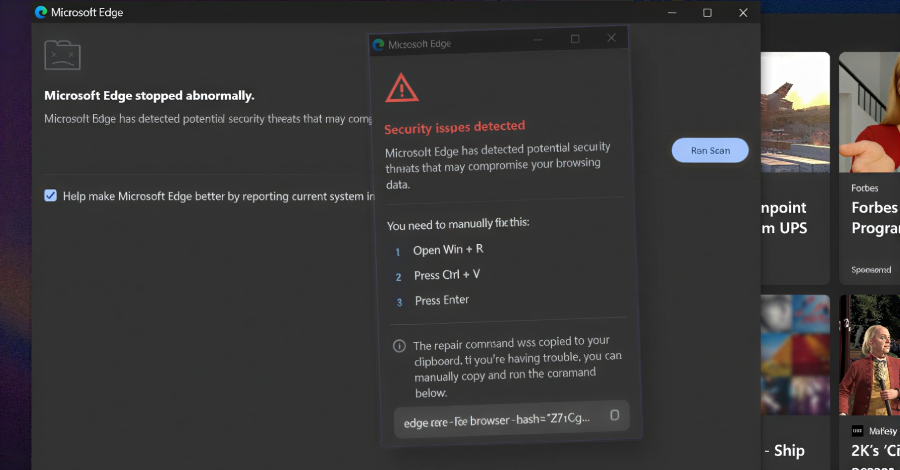
Upon browser restart, the extension displays a fake "CrashFix" security warning mimicking legitimate Windows security alerts, claiming the browser crashed due to security issues and urgently requires a "system scan" to prevent data loss. The warning instructs users to open the Windows Run dialog (Win+R) and paste a command that the extension has pre-loaded into the system clipboard using the Clipboard API.
The command appears as a "fix" but actually constitutes a multi-stage malware delivery chain leveraging legitimate Windows utilities (Finger.exe for file download, PowerShell for execution) to download and execute ModeloRAT, a Python-based Remote Access Trojan targeting domain-joined Windows systems in enterprise environments. ModeloRAT provides attackers with persistent access, reconnaissance capabilities, command execution, and encrypted command-and-control (C2) communications enabling lateral movement within corporate networks, Active Directory enumeration, credential theft, and data exfiltration.
The CrashFix campaign demonstrates the dangerous convergence of supply chain attacks (malicious extensions in official stores), social engineering (fake security warnings exploiting user trust), living-off-the-land techniques (abusing built-in Windows tools to evade detection), and browser-level denial-of-service (forced crashes creating urgency and panic), making it particularly effective against both technical and non-technical users. The distribution via malicious advertisements promoting fake ad blockers creates a vicious irony where users seeking protection from malicious ads inadvertently install malware.
Campaign Specifications
| Attribute | Details |
|---|---|
| Campaign Name | CrashFix |
| Attack Classification | ClickFix variant (social engineering + malicious Chrome extension) |
| Discovery Timeline | January 2026 |
| Distribution Vector | Malicious advertisements, Chrome Web Store |
| Malicious Extension | NexShield – Advanced Web Guardian |
| Masquerade Target | uBlock Origin Lite (legitimate ad blocker) |
| Extension Source | Google Chrome Web Store (official, now removed) |
| Activation Delay | ~60 minutes after installation (evasion technique) |
| Attack Mechanism | Browser DoS → Fake security warning → Clipboard manipulation → Command execution |
| DoS Technique | Infinite loop of Chrome API calls (memory/CPU exhaustion) |
| Social Engineering | Fake "CrashFix" security warning mimicking Windows security alerts |
| Delivery Method | Windows Run dialog (Win+R) with pre-loaded clipboard command |
| Malware Payload | ModeloRAT (Python-based Remote Access Trojan) |
| Target Systems | Domain-joined Windows systems (enterprise environments) |
| Exploitation Tools | Finger.exe (legitimate Windows utility), PowerShell |
| C2 Infrastructure | Encrypted command-and-control communications |
| Persistence Mechanism | ModeloRAT startup entries, scheduled tasks |
| Post-Compromise | Reconnaissance, credential theft, lateral movement, data exfiltration |
| Target Audience | Enterprise users seeking ad blockers (IT staff, general employees) |
| Attack Success Factor | Combination of browser crash urgency + trusted Chrome Web Store + clipboard automation |
Technical Details
Malicious Chrome Extension - NexShield
The NexShield – Advanced Web Guardian extension masquerades as a legitimate ad blocker by cloning the appearance and functionality of uBlock Origin Lite. Listed on the official Chrome Web Store with fabricated credentials (4.5-star rating, "50,000+ users", professional screenshots), the extension requests extensive permissions including clipboard access, storage manipulation, tab control, and alarm scheduling—capabilities far exceeding typical ad blocker requirements.
The extension operates in three distinct phases with a deliberate 60-minute activation delay designed to evade immediate detection and user suspicion.
Attack Workflow
Phase 1: Installation and Dormancy (T+0 to T+60 minutes)
Upon installation, the extension behaves completely benign for approximately 60 minutes, displaying fake ad-blocking statistics and mimicking legitimate extension behavior. During this dormancy period, it schedules an activation alarm and stores metadata in browser storage, creating no suspicious activity that would alert the user or security tools.
Phase 2: Browser Denial-of-Service (T+60 minutes)
When the activation timer expires, the extension initiates a multi-vector browser crash attack:
- Memory exhaustion: Allocates massive arrays in infinite loops to consume available RAM
- CPU saturation: Executes intensive computational operations across all open tabs simultaneously
- Tab flooding: Opens hundreds of blank tabs to overwhelm browser resources
- Storage overflow: Rapidly fills browser storage with garbage data
This coordinated attack renders the browser completely unresponsive within 30-60 seconds, forcing the user to terminate Chrome via Task Manager. The sudden crash creates urgency and panic, priming the victim for social engineering.
Phase 3: Social Engineering and Payload Delivery (Post-Restart)
Upon browser restart, the extension detects the relaunch and immediately displays a sophisticated fake security warning that mimics legitimate Windows security alerts. The warning page employs professional styling with gradient backgrounds, security icons, and urgent messaging claiming the crash resulted from "critical security issues" requiring immediate repair.
The deceptive warning instructs users to press Windows+R and paste a "repair command" that has been automatically copied to their clipboard via the browser's Clipboard API. Critically, the displayed command differs from the actual clipboard content—the UI shows an innocuous-looking command while the clipboard contains a complex PowerShell payload designed to download and execute ModeloRAT.
The malicious command leverages living-off-the-land techniques, abusing legitimate Windows utilities (certutil.exe for file downloads, PowerShell for execution) to evade antivirus detection while downloading the RAT payload from attacker infrastructure.
ModeloRAT Payload
ModeloRAT is a Python-based Remote Access Trojan specifically designed to target domain-joined Windows systems in enterprise environments. The malware performs target verification by checking domain membership, silently exiting on non-corporate systems to avoid security researcher analysis.
Deployment Process:
The PowerShell downloader verifies the system is domain-joined before proceeding, then downloads the Python RAT payload to a hidden directory within the Windows AppData folder. If Python is not installed, the malware downloads and installs a portable Python interpreter to ensure execution capability.
Persistence Mechanisms:
ModeloRAT establishes dual persistence through Registry Run keys (disguised as "WindowsSecurityUpdate") and Windows Scheduled Tasks (masquerading as "MicrosoftEdgeUpdateCore"), ensuring the malware survives system reboots and automatic startup.
Capabilities:
- Command-and-Control: Establishes encrypted connections to attacker infrastructure over port 443 (HTTPS) to blend with legitimate traffic, with 5-minute beacon intervals to avoid network anomaly detection
- System Reconnaissance: Collects comprehensive system information including hostname, username, domain membership, OS version, IP addressing, and privilege level
- Command Execution: Executes arbitrary shell commands with output capture and exfiltration
- File Operations: Downloads files from victim systems and uploads additional payloads or tools
- Credential Access: Enables deployment of credential theft tools like Mimikatz for harvesting passwords and authentication tokens
- Lateral Movement: Facilitates network reconnaissance and movement to additional systems within the compromised domain
The RAT maintains persistent access through automatic reconnection logic, attempting to re-establish C2 communications every 5 minutes if connection is lost, ensuring long-term access for attackers to conduct further reconnaissance, credential theft, and data exfiltration operations.
Attack Scenario
Corporate IT Department - Credential Theft and Lateral Movement
Initial Infection Vector
Michael Chen, an IT Support Specialist at GlobalTech Solutions, searches for an ad blocker while browsing during his lunch break. He clicks on a sponsored search result recommending "NexShield – Advanced Web Guardian" and installs it from the Chrome Web Store, trusting the professional appearance and fabricated ratings.
Extension Installation
The extension behaves normally for 60 minutes after installation, displaying fake ad-blocking statistics to build trust. During this dormancy period, it secretly schedules an activation timer while Michael continues his work unaware.
Browser Crash - Delayed Activation
Exactly 60 minutes after installation, the extension triggers a coordinated denial-of-service attack, exhausting system memory and CPU resources. Michael's browser becomes unresponsive, consuming over 8GB of RAM before he's forced to terminate Chrome through Task Manager.
Fake Security Warning
Upon restarting Chrome, Michael immediately sees a professional-looking security warning claiming his browser crashed due to critical security issues. The warning instructs him to press Windows+R and paste a "repair command" that has been automatically copied to his clipboard. The warning appears legitimate, mentioning the NexShield extension he just installed.
Command Execution - Social Engineering Success
Trusting the official-looking warning and believing it will fix his crashed browser, Michael follows the instructions. He opens the Windows Run dialog and pastes the clipboard contents, which contains a complex PowerShell command disguised as a security repair. Despite the command's complexity, Michael executes it, believing it's necessary to restore browser functionality.
Malware Deployment - ModeloRAT Installation
The PowerShell command downloads and installs ModeloRAT, a remote access trojan targeting domain-joined systems. The malware verifies Michael's computer is connected to the corporate domain before proceeding. It establishes persistence through Registry entries and scheduled tasks disguised as legitimate Windows updates, then connects to attacker infrastructure over encrypted channels. Michael sees a success message indicating his browser is "now secure" with no visible signs of compromise.
Attacker Reconnaissance
The attackers gain access to Michael's IT Support account and begin mapping the corporate network. They discover his account has elevated privileges on workstations due to IT Support group membership. Through reconnaissance commands, they identify the domain structure, locate 2,487 domain users, discover the domain controller, and identify Domain Admin accounts. The attackers recognize this as a high-value compromise with clear paths to escalation.
Privilege Escalation and Lateral Movement
Over the following days, attackers exploit Michael's IT Support privileges to move laterally across the network. They access the IT department file server and discover an Excel spreadsheet containing Domain Admin credentials stored in plain text. Using these harvested credentials, they gain complete control over the Active Directory environment, compromising 15 additional workstations and exfiltrating 4.2GB of sensitive data including credentials, network diagrams, and employee information.
Discovery and Incident Response
After 11 days, the security team detects suspicious PowerShell activity through endpoint detection tools. Forensic analysis reveals the full scope of the breach: ModeloRAT installed on 16 systems, 37 user passwords compromised, 2 Domain Admin accounts breached, and extensive data exfiltration. The incident response requires isolating affected systems, resetting all compromised credentials including a forced domain-wide password reset, removing the malicious extension across all browsers, and rebuilding 16 systems from clean images. The total incident cost reaches $340,000 including forensics, system rebuilds, productivity loss, and security tool upgrades. The root cause is traced back to the malicious Chrome extension combined with weak credential storage practices.
Impact Assessment
Credential theft and data exfiltration:
- Credentials: User passwords, Domain Admin credentials, service account passwords stored in IT documentation
- Domain Intelligence: Active Directory structure, user accounts, group memberships, domain trust relationships
- Network Information: IP addressing schemes, network diagrams, server inventory, VLAN configurations
- Corporate Data: Employee information, file server contents, IT documentation, sensitive business files
- Browser Data: Browsing history, saved passwords, cookies, form data accessible via Chrome extension permissions
System modification and persistent access:
- Malware Installation: ModeloRAT deployed with persistence mechanisms (Registry Run keys, Scheduled Tasks)
- Browser Compromise: Malicious extension modifies browser behavior, manipulates clipboard, controls user experience
- Configuration Changes: System settings modified for persistence, firewall rules potentially altered
- File System Modifications: Malicious Python scripts, PowerShell payloads stored on disk
- Registry Tampering: Persistence entries in Run keys mimicking legitimate Windows update processes
Browser disruption and operational impact:
- Browser DoS: Deliberate browser crashes causing work interruption, data loss in unsaved work
- System Resources: Memory/CPU exhaustion during crash phase impacts other applications
- Repeated Warnings: Continuous fake security warnings if extension not removed, disrupting user productivity
- Incident Response Downtime: Compromised systems taken offline for forensics and rebuilding (multi-day outage)
- User Frustration: Fake crashes and warnings cause user frustration, IT support burden
Targeted attack against corporate networks:
- Target Verification: Malware only activates on domain-joined Windows systems (checks for corporate environments, ignores home users)
- IT Privileged Users: Particularly effective against IT staff with elevated privileges enabling rapid lateral movement
- Distribution Scale: Chrome Web Store distribution reaches thousands of potential victims
- Lateral Movement Risk: Single compromised account enables enterprise-wide compromise via Active Directory exploitation
- Supply Chain Element: Official Chrome Web Store abuse undermines trust in browser extension ecosystem
- Global Reach: Not geographically limited, any enterprise user installing extension worldwide is vulnerable
Mitigation Strategies
Browser Extension Controls
Chrome Enterprise Policies: Deploy Group Policy to restrict extension installations by blocking all extensions by default, then allowing only approved extensions through an allowlist. Configure policies to block extensions from unknown sources and force-remove specific malicious extensions. Push these policies to all domain computers through Group Policy updates.
Extension Audit: Regularly scan domain computers for malicious extensions by checking Chrome extension directories across user profiles. Maintain a list of known malicious extension IDs and automatically remove any detected instances while logging the events to your SIEM system.
Endpoint Detection & Response
Detection Rules: Implement EDR rules to detect suspicious PowerShell execution patterns, particularly those involving certutil downloads or execution policy bypasses. Monitor for Chrome processes accessing clipboard APIs followed by PowerShell execution. Watch for unusual network connections from legitimate Windows utilities like finger.exe. Track Registry modifications creating Python-based persistence mechanisms and suspicious scheduled tasks masquerading as legitimate Windows services.
Network Monitoring
C2 Traffic Detection: Monitor for periodic HTTPS connections occurring at exact 5-minute intervals with minimal data transfer, which matches ModeloRAT's beacon pattern. Create SIEM rules to identify systems making regular connections to the same external destination with consistent timing and low bandwidth usage.
Firewall Controls: Block known malicious C2 domains and IP addresses at the firewall level. Deploy these blocking rules across the entire domain through Group Policy.
Security Awareness Training
User Education Program: Train users to only install extensions from the official Chrome Web Store and carefully review requested permissions. Teach recognition of social engineering tactics, particularly fake security warnings that appear after browser crashes. Emphasize that legitimate security tools never pre-load commands to the clipboard or instruct users to paste commands into the Windows Run dialog. Conduct regular phishing simulations that mimic CrashFix attack patterns and provide additional training to users who fall for simulated attacks.
Resources
Media Coverage
- Malicious Chrome Extension Crashes Browser in ClickFix Variant 'CrashFix' - SecurityWeek
- CrashFix Browser Extension Campaign
- CrashFix Chrome Extension Delivers ModeloRAT Using ClickFix-Style Browser Crash Lures
- CrashFix Chrome Extension Delivers ModeloRAT Using ClickFix-Style Browser Crash Lures - Live Threat Intelligence - Threat Radar | OffSeq.com
- Fake ad blocker extension crashes the browser for ClickFix attacks
- New CrashFix attack uses fake uBlock extension to drop ModeloRAT malware
Last Updated: January 20, 2026