Predator Spyware: iOS Mic/Camera Indicator Suppression
Commercial Spyware iOS Targeting Surveillance Covert Recording
Overview
Predator is a sophisticated commercial spyware developed by Intellexa that can hook into the iOS SpringBoard process to disable the camera and microphone activity indicators (green/orange status bar dots) that iOS normally shows when sensors are in use. By injecting code into SpringBoard's internal functions and nullifying sensor state update objects, Predator silently suppresses the indicator updates before reaching the UI, enabling covert recording and surveillance undetectable by users. This advanced capability requires kernel-level access already obtained through prior exploitation, demonstrating how sophisticated spyware abuses deep system access to subvert fundamental iOS privacy protections.
Technical Specifications
| Attribute | Details |
|---|---|
| Spyware Family | Predator (by Intellexa) |
| Platform | iOS |
| Primary Capability | Mic/Camera indicator suppression |
| Required Access Level | Kernel-level |
| Injection Target | iOS SpringBoard process |
| Targeted Method | _handleNewDomainData (_SBSensorActivityDataProvider) |
| Detection Evasion | Visual indicator suppression |
| Attack Surface | System UI internals, sensor state management |
| Distribution | Targeted delivery via exploits, malicious links, social engineering |
Affected Products
- iOS devices (all versions vulnerable if compromised)
- Devices with Predator installed and kernel-level access obtained
- Targets typically: journalists, activists, political figures, business executives
- Status: Active commercial spyware deployment
Technical Details
Access Requirements
- Prerequisite: Kernel-level access already obtained on target device
- Method: Prior exploitation of iOS vulnerability or initial compromise
- Scope: Full system compromise required for effective deployment
- Privilege Level: Operating system kernel access and service account manipulation
Indicator Suppression Mechanism
SpringBoard Hooking:
- Predator injects code into SpringBoard, iOS's core system process managing the UI
- Targets internal function handling sensor activity updates
- Specifically hooks
_handleNewDomainData:method - Intercepts sensor state information before UI rendering
Objective-C Exploitation:
- Nullifies the object responsible for sensor state updates (SBSensorActivityDataProvider)
- Objective-C semantics cause calls to nil objects to silently fail
- Indicator updates are dropped at the Objective-C runtime level
- No UI crashes or error messages generated—silent suppression
Visual Indicator Suppression:
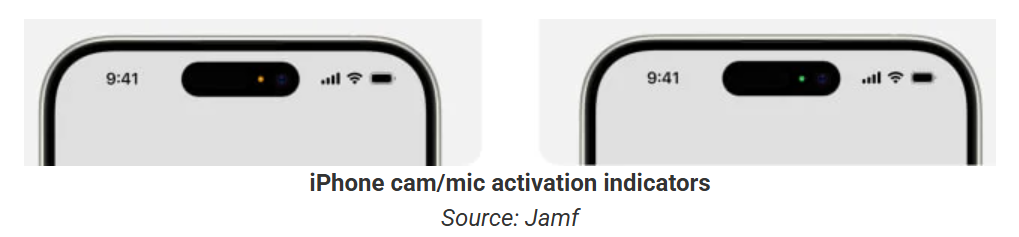
- Green dot (microphone activity) no longer appears in status bar
- Orange dot (camera activity) no longer appears in status bar
- Combined camera+mic indicator (green/orange combined dot) suppressed
- Users unaware of active sensor usage
Objective-C Silent Failure Technique
// Predator nullifies the sensor state provider:
SBSensorActivityDataProvider = nil;

// Subsequent method calls silently fail:
[SBSensorActivityDataProvider updateSensorState:];
// No error, no exception, no UI update—just silent nil dispatch
Surveillance Capabilities Beyond Indicators
- Microphone recording and audio capture (without user knowledge)
- Camera video recording and photo capture
- Exfiltration of GPS location data
- Monitoring of cellular and Wi-Fi connections
- Possible access to additional private data and sensors
Attack Scenario
-
Initial Infection:
- Predator reaches target device through:
- Targeted zero-day exploitation
- Malicious links or phishing messages
- Social engineering and credential compromise
- Watering hole attacks on news/political websites
- Installation often invisible to user or disguised as legitimate app
- Predator reaches target device through:
-
Privilege Escalation:
- Spyware obtains kernel-level permissions
- Exploits privilege escalation vulnerability
- Enables access to system internals and protected processes
- Establishes persistent system-level foothold
-
SpringBoard Code Injection:
- Predator injects code into SpringBoard process
- Hooks internal sensor update handling function
- Nullifies SBSensorActivityDataProvider object
- Begins suppressing indicator updates
-
Covert Surveillance Initiation:
- Microphone activated for audio recording
- Camera activated for video or photo capture
- No green/orange indicator appears to alert user
- Sensor usage completely invisible on status bar
-
Data Exfiltration:
- Recorded audio and video captured
- Additional private data collected (location, contacts, messages)
- Encrypted exfiltration to attacker infrastructure
- Long-term surveillance of target without detection
Impact Assessment
- Complete microphone recording without user knowledge
- Camera surveillance without visual indicator
- Covert recording of all conversations in device's presence
- Exposure of sensitive personal information and secrets
- Private moments and locations captured without consent
- Journalists unable to trust device security
- Activists and political figures targeted for surveillance
- Business executives exposed to corporate espionage
- Vulnerable populations (victims of abuse) further endangered
- Fundamental erosion of trust in iOS privacy protections
- Defeat of fundamental iOS privacy protection (indicator dots)
- Subversion of system-level security and user warnings
- Loss of confidence in device sensor protections
- Demonstration of deep system compromise capability
- Evidence that iOS can be comprehensively compromised
- Government officials and military compromised
- Confidential business negotiations recorded
- Legal privileged communications captured
- Trade secrets and intellectual property exposed
- National security implications in sensitive operations
Mitigation Strategies
Device Hardening & Lockdown
- Enable Lockdown Mode: Use iOS Lockdown Mode to significantly harden device against targeted exploits
- Keep iOS Updated: Maintain latest iOS version to minimize zero-day exploit surface
- Security Updates: Apply all security patches and minor OS updates promptly
- Forced Software Updates: Ensure automatic security updates are enabled and applied
- Baseline Security: Implement rigorous security configuration through Mobile Device Management (MDM)
Limiting Attack Surface
- Disable Unnecessary Features: Turn off Bluetooth, NFC, and location services when not in use
- App Installation Restrictions: Restrict app installation to official App Store only
- Enterprise Certificate Control: Audit and remove unnecessary enterprise certificates
- Profile Management: Monitor and remove suspicious or unknown device profiles
- Jailbreak Prevention: Detect and prevent jailbreaking attempts that enable kernel access
Physical Device Security
- Device Possession: Maintain physical control and security of device at all times
- Untrusted Computers: Never connect device to potentially compromised computers
- USB Restricted Mode: Use USB Restricted Mode to limit port connectivity
- Supervised Mode: Consider supervised device mode for high-risk environments
- Regular Device Audit: Periodically audit device for unknown apps or unexpected behavior
Sensor Indicator Verification
- Manual Verification: Periodically verify that green/orange dots appear when using camera/mic apps
- Test Recording: Use legitimate recording apps and verify indicator visibility
- Visual Audit: Visually inspect status bar for indicator dots during known sensor usage
- Frequency Testing: Establish routine verification schedule for high-risk users
- Baseline Documentation: Document normal indicator behavior for comparison
Resources and References
Incident Reports
Last Updated: February 23, 2026