FlutterShell macOS Backdoor Campaign

macOS Malware Backdoor Malvertising Operation FlutterBridge
Overview
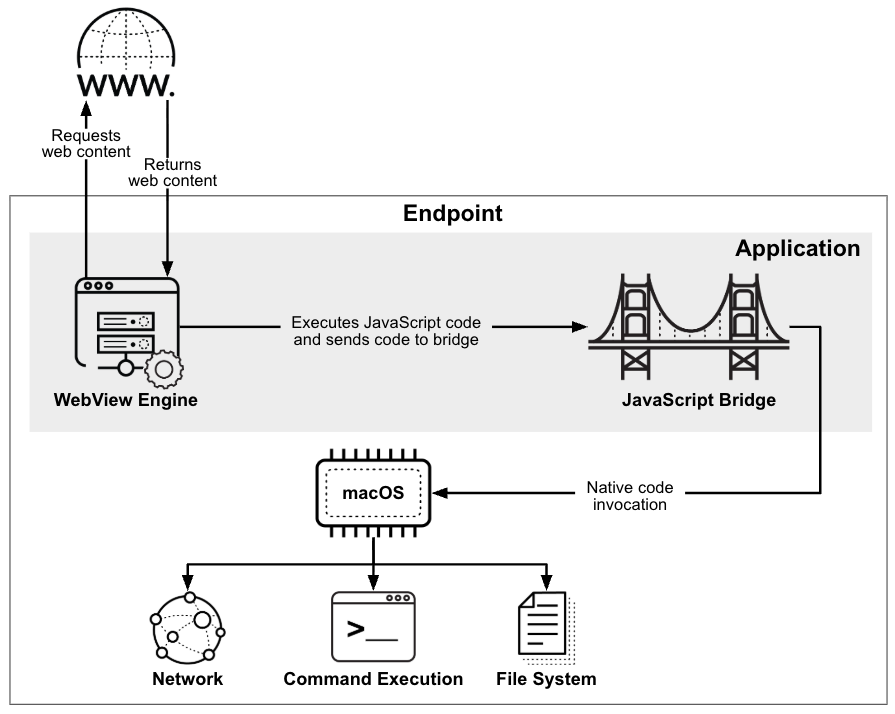
Researchers discovered a sophisticated macOS malware campaign named "Operation FlutterBridge" distributing a backdoor called "FlutterShell" through malicious Google and YouTube advertisements. The malware disguises itself as legitimate software applications and provides attackers with remote access to infected systems.
Technical Specifications
| Attribute | Details |
|---|---|
| Campaign Name | Operation FlutterBridge |
| Malware Family | FlutterShell backdoor |
| Primary Delivery Vector | Malicious Google and YouTube sponsored advertisements (malvertising) |
| Target Platform | macOS |
| Development Stack | Google Flutter with WebView and JavaScript bridges |
| Execution Method | Dynamic loading of malicious code from attacker-controlled infrastructure |
| Core Capabilities | Remote command execution, file manipulation, persistence, payload download, and data theft |
| Evasion Traits | Designed to evade static analysis and traditional detection methods |
| Observed Advanced Abuse | Some variants reportedly abuse AI-powered document summarization workflows for data exfiltration |
| CVE IDs | Not specified for this campaign |
Affected Products
- macOS endpoints where users install software from untrusted ads or unofficial sources
- Users searching for software and downloading trojanized applications from malicious ad links
- Enterprise environments with unmanaged or weakly monitored macOS application execution controls
Attack Scenario
- A victim searches online for software.
- Attacker-sponsored ads appear on Google or YouTube.
- The victim downloads a trojanized macOS application.
- FlutterShell installs silently and establishes persistence.
- The backdoor connects to attacker C2 infrastructure.
- Attackers execute commands, steal data, or deploy additional payloads remotely.
Impact
- Unauthorized remote command execution on infected macOS systems
- Persistent compromise through startup/persistence mechanisms
- Potential modification of local files and endpoint configurations
- Theft of sensitive documents, credentials, and local data
- Possible abuse of AI-assisted workflows to extract high-value content
- Increased espionage risk in enterprises using macOS devices for sensitive operations
- Endpoint instability from follow-on payloads or adversary actions
- Potential deployment of additional malware/adware impacting system performance
- Operational disruption if infected devices are leveraged for lateral movement or broader compromise
Mitigations
Immediate Actions
- Download applications only from trusted official sources or the Mac App Store
- Avoid clicking sponsored software advertisements
- Enable macOS Gatekeeper and XProtect
Short-term Measures
- Keep macOS and installed applications fully updated
- Restrict execution of unapproved applications
- Isolate and investigate endpoints suspected of malvertising-based compromise
Resources
Open-Source Reporting
- FlutterShell Backdoor Spreads to macOS via Malicious Google and YouTube Ads
- Operation FlutterBridge: macOS Malvertising Campaign Spreads New FlutterShell Backdoor
- FlutterShell Backdoor Weaponizes Flutter's Architecture to E — Threat Campaign Analysis
- Malicious podcast, PDF apps spread FlutterShell macOS backdoor malware | news | SC Media
- Operation FlutterBridge MacOS Backdoor Via Google Ads
Last Updated: June 7, 2026